Our Short List of 3

- Best for: An editor who wants CL30 latency and a kit that moves between AMD and Intel builds.
- 64GB total capacity as 2x32GB modules
- DDR5-6000 speed with CL30-36-36-76 timings
- 1.4V operating voltage
- AMD EXPO and Intel XMP 3.0 support

- Best for: A white-themed editing build that needs CL30 latency to match.
- 64GB total capacity as 2x32GB modules
- DDR5-6000MT/s speed with CL30-40-40-96 timings
- 1.40V operating voltage
- Intel XMP 3.0 support
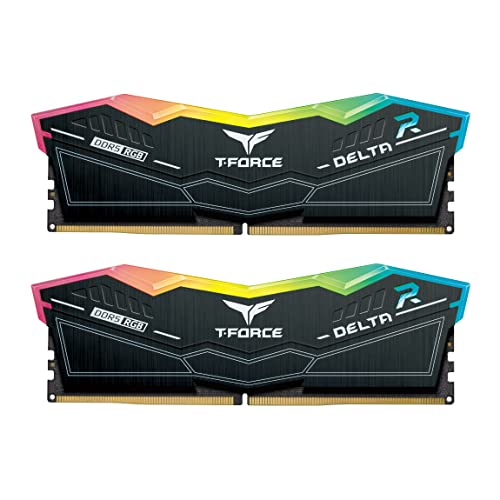
- Best for: An editor who wants wide RGB lighting and a kit that fits AMD or Intel boards.
- 64GB total capacity as 2x32GB modules
- DDR5-6000MHz speed with CL38 timings
- PC5-48000 rating
- Intel XMP 3.0 and AMD EXPO support
All 3 Picks at a Glance
| Product | Specs | Action |
|---|---|---|
| CORSAIR Vengeance RGB DDR5 |
| Check price on Amazon |
| G.SKILL Trident Z5 RGB White |
| Check price on Amazon |
| TEAMGROUP T-Force Delta RGB |
| Check price on Amazon |
Key takeaways
- Compare the best 64GB DDR5 memory kits for video editing, from low-latency CL30 kits to RGB models with wide motherboard support.
For video editing, the memory decision is less about chasing the highest number on the box and more about giving the timeline room to breathe. A 64GB kit holds large 4K timelines, preview files, and background renders without forcing the system to swap data to disk, which is where stutter and slow exports begin. Two sticks of 32GB also leave two slots free on most boards, so the build can grow later without replacing the whole kit.
This guide is for editors cutting 4K footage, for creators who run an editor alongside a browser, color tools, and effects software, and for builders who want a kit that works on both AMD and Intel platforms. Each kit below was chosen from the name and specifications printed on its Amazon product page, with the capacity, speed, latency, voltage, and profile support taken from that listing.
Quick Picks
As an Amazon Associate we earn from qualifying purchases
| Product | Best for | Key spec from title |
|---|---|---|
| CORSAIR Vengeance RGB DDR5 | A low-latency AMD and Intel build | 64GB (2x32GB) 6000MHz CL30 |
| G.SKILL Trident Z5 RGB | A straightforward high-speed kit | 64GB (2x32GB) 6000MT/s CL36 |
| G.SKILL Trident Z5 Neo RGB | An AMD editing rig with tight timings | 64GB (2x32GB) 6000MT/s CL30 |
| G.SKILL Trident Z5 RGB White | A white build with low latency | 64GB (2x32GB) 6000MT/s CL30 |
| TEAMGROUP T-Force Delta RGB | A bright RGB kit with wide support | 64GB (2x32GB) 6000MHz CL38 |
How to Choose
Treat 64GB as the working set, not the headline
Video editing uses memory for footage, preview renders, effects caches, and every application open beside the editor. A 64GB kit gives a 4K timeline room to hold those layers at once, while a smaller kit forces the system to move data in and out of storage. Check the kit layout too, because two sticks of 32GB run in dual channel and leave two slots free, while four sticks of 16GB fill every slot and can limit stable speeds. For editing, the two-stick layout is the more flexible choice.
Read speed and latency together
A kit rated at 6000MHz with CL30 timings responds faster than the same speed at CL36, because latency measures how many clock cycles pass before data arrives. For editing, both numbers matter, but neither should be read alone. A 6000MHz kit is the common sweet spot for current AMD and Intel platforms, and pushing far beyond it can bring stability trade-offs that an editing machine does not need. Match the kit to the motherboard’s supported speeds before ordering.
Check EXPO and XMP support for your platform
AMD boards use EXPO profiles and Intel boards use XMP profiles to run a kit at its rated speed, and a kit that supports both gives the builder freedom to change platforms later. The rated speed only applies when the profile is enabled in the BIOS, because the kit otherwise runs at a slower default speed. Read the listing for the exact profile names, then confirm the motherboard’s memory support list includes the kit model number. A kit that is not on that list may still work, but the rated speed is not guaranteed.
Mind clearance, cooling, and voltage
Tall RGB heat spreaders look good in a windowed case, but they can clash with a large air cooler sitting over the memory slots. Check the module height on the listing and compare it with the cooler clearance in the case. Voltage matters as well, because kits at 1.4V run warmer than kits at 1.35V, and a cramped case with weak airflow will show the difference. Onboard voltage regulation, where listed, moves power control onto the module and helps keep tuning stable under long renders.
The 5 Best Options
CORSAIR Vengeance RGB DDR5
- Best for: An editor who wants CL30 latency and a kit that moves between AMD and Intel builds.
- 64GB total capacity as 2x32GB modules
- DDR5-6000 speed with CL30-36-36-76 timings
- 1.4V operating voltage
- AMD EXPO and Intel XMP 3.0 support
An editor who wants CL30 latency and a kit that moves between AMD and Intel builds.
The 1.4V rating runs warmer than lower-voltage kits, so check case airflow before enabling the full profile.
This Corsair kit suits an editor who wants low latency and a kit that works across platforms without compromise. Two 32GB modules give 64GB in dual channel, and the CL30 timings at 6000MHz keep data moving quickly during scrubbing and preview renders. AMD EXPO and Intel XMP support are both included, and the ten-zone RGB lighting runs through Corsair iCUE software, which also shows real-time frequency readings. The aluminum heat spreader and onboard voltage regulation round out a kit built for long sessions.
Watch out for: The 1.4V rating runs warmer than lower-voltage kits, so check case airflow before enabling the full profile.
G.SKILL Trident Z5 RGB
The Trident Z5 RGB is the straightforward choice for an editor who wants a proven 64GB kit at 6000MT/s without paying for the tightest timings. Its CL36 latency at 1.35V is a balanced profile that runs cooler than many low-latency kits, and the matte black heat spreader fits builds where the memory should stay understated. Both Intel XMP 3.0 and AMD EXPO are supported, so the kit suits either platform, and the RGB lighting adds a clean accent to a windowed case.
Specs
- 64GB total capacity as 2x32GB modules
- DDR5-6000MT/s speed with CL36-36-36-96 timings
- 1.35V operating voltage
- Intel XMP 3.0 and AMD EXPO support
- 288-pin U-DIMM format
- Matte black finish with RGB lighting
Best for: An editor who wants a reliable 64GB kit at a cooler 1.35V operating voltage.
Watch out for: CL36 timings are looser than the CL30 kits here, so latency-sensitive workloads may prefer the Neo RGB or the Corsair kit instead.
G.SKILL Trident Z5 Neo RGB
The Trident Z5 Neo RGB is built for AMD editing rigs, with EXPO tuning at the center of its design. It pairs 6000MT/s speed with CL30 timings, which gives the tightest response in this roundup alongside the Corsair kit, and the matte black finish suits a dark build. Two 32GB modules leave two slots free for a later upgrade, and the RGB lighting is controlled through the usual motherboard software. For an editor on a Ryzen platform who scrubs long timelines all day, this is the most focused pick here.
Specs
- 64GB total capacity as 2x32GB modules
- DDR5-6000MT/s speed with CL30-40-40-96 timings
- 1.40V operating voltage
- AMD EXPO support with Intel XMP 3.0
- 288-pin U-DIMM format
- Matte black finish with RGB lighting
Best for: An AMD editing rig where tight CL30 timings matter for timeline responsiveness.
Watch out for: The kit is tuned for AMD EXPO first, so Intel builders should confirm the XMP profile on their board’s support list.
G.SKILL Trident Z5 RGB White
- Best for: A white-themed editing build that needs CL30 latency to match.
- 64GB total capacity as 2x32GB modules
- DDR5-6000MT/s speed with CL30-40-40-96 timings
- 1.40V operating voltage
- Intel XMP 3.0 support
A white-themed editing build that needs CL30 latency to match.
White modules show dust and fingerprints more readily than black ones, and the finish limits the kit to builds where the color scheme fits.
This white Trident Z5 RGB kit gives a light-colored build the same low-latency profile as the Neo RGB, with 6000MT/s speed and CL30 timings in a matte white finish. It is the pick for an editor who wants the memory to match a white case, white cooler, and white motherboard without giving up performance. Intel XMP 3.0 is the headline profile, and the two 32GB modules keep the dual-channel layout that editing timelines favor.
Watch out for: White modules show dust and fingerprints more readily than black ones, and the finish limits the kit to builds where the color scheme fits.
TEAMGROUP T-Force Delta RGB
- Best for: An editor who wants wide RGB lighting and a kit that fits AMD or Intel boards.
- 64GB total capacity as 2x32GB modules
- DDR5-6000MHz speed with CL38 timings
- PC5-48000 rating
- Intel XMP 3.0 and AMD EXPO support
An editor who wants wide RGB lighting and a kit that fits AMD or Intel boards.
CL38 timings are the loosest here, so editors who prioritize latency over lighting should choose a CL30 kit instead.
The T-Force Delta RGB suits an editor who wants a bright, showpiece kit with broad motherboard support. Its 120-degree ultra-wide RGB lighting is the most visible in this roundup, and the kit supports both Intel XMP 3.0 and AMD EXPO, so it fits either platform. At CL38 the timings are looser than the CL30 kits, but the 6000MHz speed and 64GB capacity still give a 4K timeline plenty of room. The black heat spreader keeps the look grounded while the lighting does the talking.
Watch out for: CL38 timings are the loosest here, so editors who prioritize latency over lighting should choose a CL30 kit instead.
Which One Fits Your Situation
You edit 4K footage on an AMD Ryzen build
Choose the G.SKILL Trident Z5 Neo RGB. Its EXPO tuning and CL30 timings suit Ryzen platforms, and the two-stick layout leaves room to grow. The Corsair Vengeance RGB is the alternative if the build may move to Intel later. The two-stick layout also keeps two slots open, so the build can grow to 128GB later if needed.
You edit on Intel and want low latency
Choose the CORSAIR Vengeance RGB DDR5 or the G.SKILL Trident Z5 RGB White. Both run at 6000MHz with CL30 timings, and the Corsair kit adds iCUE monitoring while the white G.Skill kit fits a light-colored build. Check the motherboard support list for the exact model number either way. Either kit runs at its rated speed once the XMP profile is enabled in the BIOS settings.
You want the coolest-running 64GB kit here
Choose the G.SKILL Trident Z5 RGB in matte black. Its 1.35V operating voltage runs cooler than the 1.4V kits, and the CL36 profile is a balanced trade for long renders in a compact case. The looser timings are the price of that cooler running. Lower voltage also means less heat inside a compact case during long rendering sessions.
You want the build to stand out visually
Choose the TEAMGROUP T-Force Delta RGB. The wide RGB lighting is the most visible in this roundup, and the kit still delivers 64GB at 6000MHz for editing. Accept the CL38 timings as the trade for the lighting, or step up to a CL30 kit if latency matters more than looks. The lighting can be set to a steady color as well, so the build stays calm during focused editing work.
Common Mistakes
- Buying four sticks of 16GB instead of two sticks of 32GB, which fills every slot and can limit stable speeds.
- Forgetting to enable EXPO or XMP in the BIOS, so the kit runs at a slower default speed than the rated figure.
- Choosing a kit by speed alone and ignoring latency, which decides how quickly data actually arrives.
- Ordering tall RGB modules without checking clearance against a large air cooler.
- Skipping the motherboard memory support list and then finding the rated speed is not guaranteed on that board.
Frequently Asked Questions
Is 64GB of DDR5 enough for 4K video editing?
Yes, for most 4K workflows. A 64GB kit holds the timeline, preview files, and background tasks without forcing the system to swap data to disk, which is the main cause of stutter during scrubbing. Editors working with very long timelines, heavy effects, or multiple applications open at once benefit most from the extra headroom.
Do I need two sticks or four sticks for 64GB?
Two sticks of 32GB is the better layout for most editing builds. It runs in dual channel, leaves two slots free for a future upgrade, and generally holds its rated speed more easily than four sticks. Four sticks of 16GB fill every slot and can run at lower stable speeds on DDR5 platforms.
What is the difference between EXPO and XMP?
EXPO is AMD’s memory profile system and XMP is Intel’s, and each one stores the rated speed, timings, and voltage for a kit. Many kits support both, which lets the same memory run at its rated speed on either platform. The profile must be enabled in the BIOS, or the kit runs at a slower default speed.
Will faster RAM make my exports noticeably quicker?
Faster memory helps most during scrubbing, previewing, and working with effects, where data moves constantly between memory and the processor. Export speed depends more on the processor and graphics card, so memory is one part of a balanced editing build rather than the whole answer. A 64GB kit at 6000MHz is a solid match for current editing platforms.