Key takeaways
- Compare the best 192GB DDR5 memory kits with JEDEC profiles for workstations, desktops and servers, from 4800 MT/s non-ECC UDIMMs to 5600 MT/s ECC kits.
A 192GB DDR5 kit is not a casual upgrade. It is a capacity decision for machines that run out of memory long before they run out of processing power: large local language models, virtual machines, 8K video timelines, simulation data sets and in-memory databases. The real question is not how fast the kit can run on paper, but whether your board will accept four 48GB modules, or six 32GB modules, at a stable JEDEC speed without manual tuning.
This guide covers workstation builders, desktop power users, small-server owners and Supermicro workstation users. Every pick below comes from the product name and specifications shown on its Amazon listing, so you can check the capacity, speed, latency, voltage and module type against your motherboard manual before ordering.
Quick Picks
As an Amazon Associate we earn from qualifying purchases.
| Product | Best for | Key spec from title |
|---|---|---|
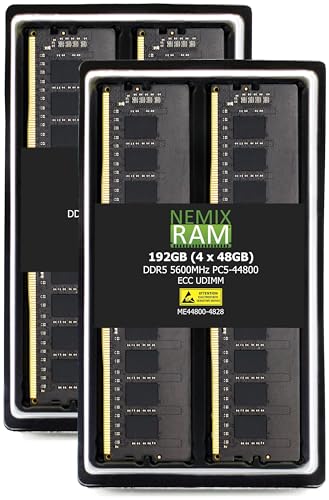
| NEMIX RAM 192GB (4 x 48GB) DDR5-5600 ECC UDIMM Kit | Fastest JEDEC workstation memory with error correction | DDR5-5600, CL46, ECC UDIMM |
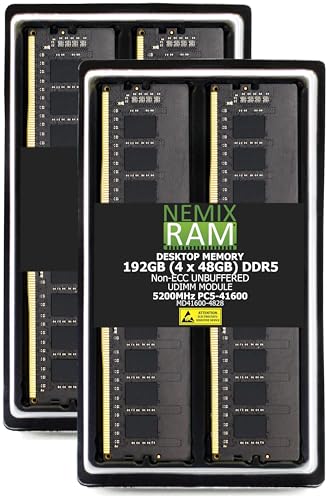
| NEMIX RAM 192GB (4 x 48GB) DDR5-5200 Non-ECC UDIMM Kit | Balanced desktop speed without ECC | DDR5-5200, CL44, non-ECC UDIMM |
| NEMIX RAM 192GB (4 x 48GB) DDR5-4800 Non-ECC UDIMM Kit | Maximum compatibility at base JEDEC speed | DDR5-4800, CL40, non-ECC UDIMM |
| NEMIX RAM 192GB (6 x 32GB) DDR5-4800 ECC RDIMM Kit | Registered server and workstation boards | DDR5-4800, CL40, ECC RDIMM |
How to Choose
Match the module type to your board first
UDIMM, ECC UDIMM and RDIMM are not interchangeable, and this is the single most common reason a 192GB kit gets returned. Most desktop boards take unbuffered UDIMMs only. Workstation boards based on AMD Threadripper Pro or Intel W-series chipsets often accept ECC UDIMMs. Registered RDIMMs belong on server and workstation boards that explicitly list RDIMM support, such as the Supermicro X13DAI-T. Open your motherboard manual, find the memory support list, and confirm the exact module type and the maximum capacity per slot before you spend anything.
Treat JEDEC speed as the honest speed
A JEDEC profile runs at the standard voltage of 1.1V with standard timings, so the kit should boot at its rated speed with no profile to enable and no manual tuning. DDR5-4800 at CL40, DDR5-5200 at CL44 and DDR5-5600 at CL46 are all standard JEDEC bins. That matters at 192GB because four large dual-rank modules are harder for a memory controller to drive than two small ones. A kit that depends on an overclocking profile to reach its headline speed may fall back to a slower JEDEC speed on your board, while a true JEDEC kit runs as labelled.
Decide whether you need ECC
Error-correcting memory detects and fixes single-bit errors, which is valuable when a machine holds a large working set in memory for hours at a time. Scientific computing, financial modelling, long renders and virtualization hosts all benefit. For gaming and general desktop use, ECC adds cost and slightly limits board choice without a visible payoff. Note that ECC UDIMMs only correct errors on boards and processors that support ECC; on a board without ECC support they either fail to boot or run without correction, so the feature is only as good as the platform underneath it.
Count slots, ranks and channels honestly
A 4 x 48GB kit needs four free DIMM slots and a board rated for 48GB modules, while a 6 x 32GB RDIMM kit needs six slots on a server board. Four dual-rank 48GB modules also place a heavier load on the memory controller, which is why some boards cap four-module configurations at a lower speed than two-module ones. Check the manual for the four-DIMM speed limit, confirm the board supports 192GB in total, and remember that mixing this kit with older modules invites instability. Buy the full 192GB as one matched kit rather than adding modules later.
The 4 Best Options
NEMIX RAM 192GB (4 x 48GB) DDR5-5600 ECC UDIMM Kit
This is the fastest JEDEC option in this roundup, pairing four 48GB ECC unbuffered modules with DDR5-5600 speed at standard 1.1V. Error correction suits long-running workstation jobs where a flipped bit in a large data set can waste hours of work, and the 5600 MT/s transfer rate keeps large models and timelines moving. Because it is a JEDEC kit rather than an overclocked one, it should run at its rated speed on ECC-capable workstation boards without profile juggling, provided the board lists 48GB ECC UDIMMs as supported.
Specs
- Capacity: 192GB (4 x 48GB)
- Speed: DDR5-5600 (PC5-44800)
- Type: ECC unbuffered UDIMM
- CAS latency: CL46
- Voltage: 1.1V
- Pins: 288-pin
- Rank: 2Rx8
Best for: ECC-capable workstation builds that need the fastest JEDEC speed with error correction.
Watch out for: ECC UDIMMs need a board and processor that support ECC; they are not a drop-in upgrade for ordinary desktop boards.
NEMIX RAM 192GB (4 x 48GB) DDR5-5200 Non-ECC UDIMM Kit
Sitting between the base-speed and top-speed kits, this DDR5-5200 set is the middle-ground choice for desktop builders who want more headroom than DDR5-4800 without paying for ECC. Four 48GB dual-rank modules deliver the full 192GB on a standard four-slot desktop board, and the 1.1V JEDEC voltage means it runs at its rated speed without an overclocking profile. It is a straightforward fit for high-end AM5 and LGA1700 desktops whose manuals list 48GB non-ECC UDIMMs, and the CL44 latency keeps pace with the higher transfer rate.
Specs
- Capacity: 192GB (4 x 48GB)
- Speed: 5200 MHz
- Type: DDR5 non-ECC UDIMM
- CAS latency: CL44
- Voltage: 1.1 volts
- Pins: 288-pin
- Rank: 2Rx8
- Data transfer rate: 5200 MHz
Best for: Desktop power users who want a step up from base JEDEC speed on a standard non-ECC board.
Watch out for: Four dual-rank 48GB modules can force some boards to a lower speed, so check the four-DIMM limit in your manual first.
NEMIX RAM 192GB (4 x 48GB) DDR5-4800 Non-ECC UDIMM Kit

This is the compatibility-first pick. DDR5-4800 at CL40 is the base JEDEC speed for DDR5, which makes it the kit most likely to boot at full speed on the widest range of desktop boards, including older DDR5 platforms and prebuilt towers. Four 48GB modules give you 192GB without touching ECC or registered memory, and the standard 1.1V keeps heat and power draw modest. If your board is fussy about large modules or you simply want the least risky path to 192GB, this is where to start.
Specs
- Capacity: 192GB (4 x 48GB)
- Speed: 4800 MHz
- Type: DDR5 non-ECC UDIMM
- CAS latency: CL40
- Voltage: 1.1 volts
- Pins: 288-pin
- Rank: 2Rx8
- Data transfer rate: 4800 MHz
Best for: Maximum board compatibility and a no-surprises 192GB upgrade on a standard desktop.
Watch out for: It is the slowest kit here, so memory-bandwidth-heavy jobs will notice the gap against the 5200 and 5600 kits.
NEMIX RAM 192GB (6 x 32GB) DDR5-4800 ECC RDIMM Kit

This kit plays a different role from the other three. Six 32GB registered modules are built for server and workstation boards that require RDIMMs, and the listing names Supermicro SuperWorkstation compatibility, including the SYS-751A-I and X13DAI-T board. Registered memory buffers the address and command signals, which is what lets server boards scale to very large capacities across many slots. The DDR5-4800 speed and CL40 latency are standard JEDEC values at 1.1V, so the emphasis here is stability and capacity across six channels, not raw bandwidth.
Specs
- Capacity: 192GB (6 x 32GB)
- Speed: 4800 MHz
- Type: DDR5 ECC RDIMM, registered
- CAS latency: CL40
- Voltage: 1.1 volts
- Pins: 288-pin
- Rank: 1Rx4
- Compatible board: Supermicro X13DAI-T, SuperWorkstation SYS-751A-I
Best for: Server and workstation boards that require registered ECC memory across six slots.
Watch out for: RDIMMs will not work in desktop boards; only buy this kit if your board explicitly lists RDIMM support.
Which One Fits Your Situation
You run a workstation with ECC support
Choose the DDR5-5600 ECC UDIMM kit. It combines error correction with the fastest JEDEC speed in this guide, which suits long renders, simulations and large data sets that sit in memory for hours. Confirm first that your board and processor support ECC UDIMMs and 48GB modules, because the correction only works on a platform that enables it.
You want 192GB in a standard desktop
Choose the DDR5-5200 non-ECC UDIMM kit if your board lists four-DIMM support at that speed, or the DDR5-4800 non-ECC kit if you want the safest boot on an older or prebuilt machine. Both use four 48GB modules on a normal four-slot board, and neither needs ECC support or an overclocking profile to run at its rated speed.
You are filling a server or Supermicro workstation
Choose the 6 x 32GB ECC RDIMM kit. Desktop UDIMMs physically fit the same slots but will not work on boards that require registered memory, so the module type matters more than the speed here. Check your board’s memory support list for the exact registered configuration and the maximum capacity per channel before ordering.
You run memory-hungry work on a tight stability budget
Choose the DDR5-4800 non-ECC UDIMM kit. Base JEDEC speed is the easiest for a memory controller to sustain across four dual-rank modules, which means fewer failed boots and fewer mysterious crashes under load. The lower transfer rate is a fair trade when uptime matters more than benchmark numbers, and the kit leaves headroom for a future BIOS update to improve compatibility further.
Common Mistakes
- Buying RDIMMs for a desktop board, or ECC UDIMMs for a board that does not support ECC, and then wondering why the machine will not boot.
- Assuming any DDR5 board accepts 48GB modules; many early DDR5 boards cap each slot at 32GB and need a BIOS update for larger modules.
- Enabling an overclocking profile and expecting four dual-rank 48GB modules to hold the same speed as two modules.
- Mixing a new 192GB kit with older modules of a different speed, rank or voltage and blaming the kit for the resulting instability.
- Ordering before checking the motherboard manual for the four-DIMM speed limit and the total maximum capacity.
Frequently Asked Questions
What does a JEDEC profile mean for a DDR5 kit?
A JEDEC profile is the standard speed, timing and voltage combination defined for DDR5 memory, running at 1.1V. Kits built on JEDEC profiles, such as DDR5-4800 CL40 or DDR5-5600 CL46, should boot at their rated speed on any compatible board without enabling an overclocking profile or adjusting settings by hand.
Can I use a 192GB DDR5 kit on a normal desktop motherboard?
You can if the board has four DIMM slots, supports 48GB modules and lists 192GB as its maximum capacity. Many early DDR5 boards cap each slot at 32GB, so check the memory support list and update the BIOS before ordering. You also need a 64-bit operating system and a processor whose memory controller supports that much memory.
Is ECC memory worth it for a 192GB kit?
ECC is worth it when the machine holds large working sets in memory for long periods, such as virtualization hosts, simulations and financial modelling, because it corrects single-bit errors before they corrupt results. For gaming and general desktop use the benefit is small, and ECC only works on boards and processors that support it.
Why do most 192GB JEDEC kits on Amazon come from one brand?
The 192GB JEDEC segment is a specialist niche: mainstream gaming brands focus on smaller overclocked kits, while high-capacity JEDEC memory is built for workstations and servers. Specialist suppliers assemble these kits from major manufacturers’ chips, which is why you will see the same brand across ECC, non-ECC, UDIMM and RDIMM variants.