Key takeaways
- Compare the best thunderbolt 4 docking stations for multi-monitor workstations, with dual 4K support, strong host charging and fast wired Ethernet picks.
A multi-monitor workstation lives or dies by its dock. One Thunderbolt 4 cable has to carry two or more displays, charge the laptop, feed a wired network, and keep every drive, card reader, and peripheral connected at full speed. When a dock falls short on any one of those jobs, the whole desk feels it: a second monitor that will not wake, a laptop battery that drains under load, or a network connection that drops back to Wi-Fi speeds. The five docks below were chosen because their listings spell out the specs that matter for this kind of setup, from display counts and resolutions to host charging wattage and Ethernet speed.

This guide is for laptop-based workstation users who run two or more external monitors and want a single-cable desk. Every pick is a genuine Thunderbolt 4 dock, and the specs quoted come from the Amazon listing name and product information for each model, not from practical claims. Read the display support notes carefully, because the number of monitors a dock can drive depends on your laptop and operating system as much as on the dock itself.
Quick Picks
Our Short List of 3
- Best for: Workstations that need the most ports, fast card readers, and 2.5 Gigabit Ethernet in one dock.
- Brand: CalDigit
- Model: TS4
- Ports: 18 total
- Thunderbolt: 3x Thunderbolt 4 (40Gb/s)
- Best for: Windows workstations running three or four 4K monitors that should plug straight into HDMI or DisplayPort.
- Brand: Plugable
- Model: TBT4-UDZ
- Ports: 16 total
- Video: 2x HDMI, 2x DisplayPort

- Best for: Compact dual-monitor workstations that want downstream Thunderbolt ports and full-power host charging.
- Brand: Plugable
- Model: TBT4-UDX1
- Ports: 11 total
- Thunderbolt: 3x Thunderbolt 4 (40Gbps), 1 host and 2 downstream at up to 15W each
All 5 Picks at a Glance
| Product | Specs | Action |
|---|---|---|
| CalDigit TS4 Thunderbolt 4 Dock |
| Check price on Amazon |
| Plugable 16-in-1 Thunderbolt 4 Dock TBT4-UDZ |
| Check price on Amazon |
| Plugable Thunderbolt 4 Docking Station TBT4-UDX1 |
| Check price on Amazon |
 Razer Thunderbolt 4 Dock Chroma |
| Check price on Amazon |
 OWC 11-Port Thunderbolt Dock |
| Check price on Amazon |
How to Choose
Display support and monitor count
Start with the monitors, because they set the ceiling for everything else. Check how many displays the dock lists, at what resolution and refresh rate, and through which connectors. The Plugable TBT4-UDZ, for example, lists support for up to four 4K 60Hz displays on Windows Thunderbolt 4 or USB4 hosts, but dual 4K 60Hz on Macs with M4 or M5, M3, and Pro or Max chips, which reflects limits on the computer side rather than the dock. Other docks here list dual 4K or dual 6K support, or a single 8K display. Also note the physical outputs: a dock with native HDMI and DisplayPort sockets saves you from adapters, while a dock that routes video through downstream Thunderbolt ports needs USB-C to HDMI or DisplayPort cables or adapters for most monitors.
Host charging wattage
A workstation laptop under load can draw a lot of power, so the dock’s host charging figure matters. The docks in this guide list host charging between 96W and 100W, delivered through the Thunderbolt 4 host connection. That range suits most thin-and-light and mid-range workstation laptops, but a large mobile workstation with a hungry processor and discrete graphics may still need its own power adapter alongside the dock. Match the dock’s listed wattage against your laptop’s adapter rating before you buy, and remember that downstream Thunderbolt ports on these docks supply much less power, typically 15W each, which is fine for phones and small accessories but not for charging a second laptop.
Port layout and downstream Thunderbolt
Count the ports you actually use every day, then check where they sit. Downstream Thunderbolt 4 ports are the most flexible connections on a dock because each one can carry data at 40Gb/s, drive a display, or host a fast external SSD. The CalDigit TS4 lists three Thunderbolt 4 ports alongside three USB-C and five USB-A ports, all at 10Gb/s for the USB connections. The Plugable TBT4-UDZ takes a different approach: it lists no downstream Thunderbolt 4 ports at all, and its rear USB-C port is a 10Gbps data and charging connection only. Neither layout is wrong, but they suit different desks. Choose downstream Thunderbolt if you run fast external drives or daisy-chained displays, and choose a video-port-heavy layout if your priority is plugging monitors straight in.
Ethernet speed and card readers
Wired networking is one of the main reasons to dock a workstation at all. Two docks here, the CalDigit TS4 and both Plugable models, list 2.5 Gigabit or 2.5Gbps Ethernet, which pairs well with fast fibre internet and a 2.5GbE switch or NAS. The OWC dock lists Gigabit Ethernet, which is still a solid, stable connection but caps transfers at the older speed. Card readers follow a similar pattern: the TS4 lists both SD 4.0 UHS-II and microSD 4.0 UHS-II readers, the OWC lists an SD 4.0 UHS-II reader, and the Plugable docks list SD or SD and microSD slots. If you move large photo or video files, UHS-II support and 2.5GbE together make a noticeable difference to a daily workflow.
The 5 Best Options
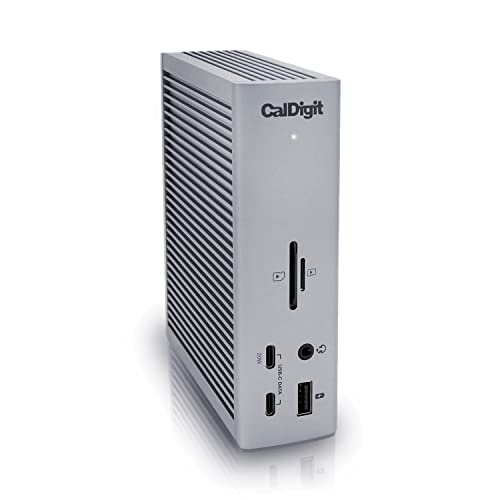
CalDigit TS4 Thunderbolt 4 Dock
- Best for: Workstations that need the most ports, fast card readers, and 2.5 Gigabit Ethernet in one dock.
- Brand: CalDigit
- Model: TS4
- Ports: 18 total
- Thunderbolt: 3x Thunderbolt 4 (40Gb/s)
Workstations that need the most ports, fast card readers, and 2.5 Gigabit Ethernet in one dock.
The port count is more than a simple two-monitor desk needs, and dual-display support depends on your host computer’s own limits.
The CalDigit TS4 is the port-count leader in this group, with 18 ports in total. Its listing includes three Thunderbolt 4 ports at 40Gb/s, three USB-C ports at 10Gb/s, and five USB-A ports at 10Gb/s, so older peripherals and newer devices connect without a hub stacked on top of the dock. Host charging runs up to 98W through the Thunderbolt 4 or USB4 host port, and each downstream Thunderbolt 4 port supplies 15W for smaller devices.
For a multi-monitor workstation, the TS4 lists display support for a single 8K display or dual 6K 60Hz displays, plus a DisplayPort 1.4 output for direct monitor connections. It also covers the extras that heavy desks rely on: SD 4.0 UHS-II and microSD 4.0 UHS-II card readers and 2.5 Gigabit Ethernet. If your workstation involves fast storage, frequent card imports, and a wired network, this is the most complete single box here.
Watch out for: The port count is more than a simple two-monitor desk needs, and dual-display support depends on your host computer’s own limits.
Plugable 16-in-1 Thunderbolt 4 Dock TBT4-UDZ
- Best for: Windows workstations running three or four 4K monitors that should plug straight into HDMI or DisplayPort.
- Brand: Plugable
- Model: TBT4-UDZ
- Ports: 16 total
- Video: 2x HDMI, 2x DisplayPort
Windows workstations running three or four 4K monitors that should plug straight into HDMI or DisplayPort.
No downstream Thunderbolt 4 ports, so it does not suit desks built around Thunderbolt drives or daisy-chained displays.
The Plugable TBT4-UDZ is built around dedicated video outputs: two HDMI and two DisplayPort sockets, which is rare among Thunderbolt 4 docks. Its listing states support for up to four 4K 60Hz displays on Windows Thunderbolt 4 or USB4 systems, making it the natural pick for a three- or four-monitor Windows workstation. On Macs with M4 or M5, M3, and Pro or Max chips, the listing states dual 4K 60Hz support.
Across its 16 ports, the TBT4-UDZ also lists a Thunderbolt 4 host connection, a USB-C port at 10Gbps, six USB ports, SD and microSD slots, an audio jack, and Ethernet. Host charging runs up to 100W, with 98W certified, and the Ethernet connection is listed at 2.5Gbps. The trade-off sits at the back of the dock: there are no downstream Thunderbolt 4 ports, so fast Thunderbolt drives and display daisy chains are not part of this design.
Watch out for: No downstream Thunderbolt 4 ports, so it does not suit desks built around Thunderbolt drives or daisy-chained displays.
Plugable Thunderbolt 4 Docking Station TBT4-UDX1
- Best for: Compact dual-monitor workstations that want downstream Thunderbolt ports and full-power host charging.
- Brand: Plugable
- Model: TBT4-UDX1
- Ports: 11 total
- Thunderbolt: 3x Thunderbolt 4 (40Gbps), 1 host and 2 downstream at up to 15W each
Compact dual-monitor workstations that want downstream Thunderbolt ports and full-power host charging.
Only one native HDMI output, so a second monitor relies on the included adapter or a Thunderbolt connection.
The Plugable TBT4-UDX1 takes the opposite route to its bigger sibling: a compact 11-port layout with three Thunderbolt 4 ports at 40Gbps, one for the host and two downstream that provide up to 15W each. Display support is listed as dual monitor, with a single 8K or dual 4K configuration, handled through an HDMI port plus an included USB-C to HDMI adapter.
Host charging runs up to 100W, with 96W certified, which is the strongest headline charging figure in this group. The remaining connections cover the workstation basics well: four USB-A ports at 10Gbps, 2.5Gbps Ethernet, an SD card reader, and a combo audio jack. For a tidy two-monitor desk that still wants downstream Thunderbolt for a fast SSD or a second display connection, this is a balanced, space-conscious option.
Watch out for: Only one native HDMI output, so a second monitor relies on the included adapter or a Thunderbolt connection.
Razer Thunderbolt 4 Dock Chroma
- Best for: Dual 4K workstations where a compact, styled dock fits the desk better than a large port expander.
- Brand: Razer
- Model: RC21-01690100-R3U1
- Ports: 10 in 1 as listed
- Display support as listed: dual 4K or single 8K video output
Dual 4K workstations where a compact, styled dock fits the desk better than a large port expander.
The listing gives fewer port-by-port details than the other docks here, so check the full specification on the product page if you need specific connections.
The Razer Thunderbolt 4 Dock packs 10 ports into a slim desktop unit with the Chroma styling the brand is known for. Its listing states dual 4K or single 8K video output, Thunderbolt 4 certification, and passthrough charging for the host laptop. The model number in the Amazon product information is RC21-01690100-R3U1.
This dock suits a dual-monitor workstation where the desk itself is on show and a large port expander would look out of place. The listing information available focuses on the headline features rather than a deep port-by-port breakdown, so buyers who need a specific socket, such as a card reader or a particular Ethernet speed, should confirm the full port list on the product page before ordering. For straightforward dual 4K setups, its stated display support covers the requirement directly.
Watch out for: The listing gives fewer port-by-port details than the other docks here, so check the full specification on the product page if you need specific connections.
OWC 11-Port Thunderbolt Dock
- Best for: Mac and PC workstations that want extra downstream Thunderbolt 4 ports for storage and accessories.
- Brand: OWC
- Model: OWCTB4DOCK
- Ports: 11 total as listed
- Thunderbolt: 3x Thunderbolt 4 ports plus host Thunderbolt 4 port (40Gb/s)
Mac and PC workstations that want extra downstream Thunderbolt 4 ports for storage and accessories.
Gigabit Ethernet rather than 2.5 Gigabit, and host charging tops out at 96W as listed.
The OWC 11-Port Thunderbolt Dock lists 11 ports for Mac and PC, built around three Thunderbolt 4 ports plus a separate host Thunderbolt 4 port, all at 40Gb/s. That extra Thunderbolt connectivity makes it easy to attach fast external storage or additional Thunderbolt accessories alongside your monitors. Display support is listed as dual 4K or 5K displays, or a single 6K or 8K display.
Host charging runs up to 96W, and the supporting cast includes three USB-A ports at 10Gb/s, one USB 2.0 port, an SD 4.0 UHS-II card reader, and a 3.5mm combo audio jack. The one step down versus the class leaders is the network connection, which is Gigabit Ethernet rather than 2.5 Gigabit. If your network and storage are not pushing past gigabit speeds, that difference will not matter day to day, and the dock’s Thunderbolt-heavy layout remains its main strength.
Watch out for: Gigabit Ethernet rather than 2.5 Gigabit, and host charging tops out at 96W as listed.
Which One Fits Your Situation
You run three or four monitors on Windows
Choose the Plugable TBT4-UDZ. It is the only dock here whose listing states support for up to four 4K 60Hz displays on Windows, and its two HDMI plus two DisplayPort outputs let every monitor connect directly without adapters.
You want one dock for a heavy desk of drives, cards, and peripherals
Choose the CalDigit TS4. With 18 ports, UHS-II SD and microSD readers, and 2.5 Gigabit Ethernet, it covers the widest range of workstation gear in a single unit.
You have a compact two-monitor desk
Choose the Plugable TBT4-UDX1 for downstream Thunderbolt ports in a smaller body, or the Razer Thunderbolt 4 Dock Chroma if a slim, styled unit matters more than a detailed port list. Both list dual-display support suitable for a standard two-screen workstation.
You split time between Mac and PC
Choose the OWC 11-Port Thunderbolt Dock, which is listed for Mac and PC with dual 4K or 5K display support. As with every dock here, confirm your specific laptop’s external display limit, since base-model Apple silicon laptops restrict how many external monitors they can drive regardless of the dock.
Common Mistakes
- Assuming the dock decides the monitor count, when the laptop’s chip and operating system set the real limit.
- Buying a dock with no downstream Thunderbolt ports, then needing one for a fast external SSD.
- Overlooking host charging wattage, so the laptop battery drains slowly during heavy workloads.
- Forgetting that most monitors need cables or adapters when a dock routes video through USB-C or Thunderbolt ports instead of native HDMI or DisplayPort sockets.
- Plugging a high-speed drive into a USB 2.0 or front convenience port instead of the 10Gb/s or Thunderbolt connections.
Frequently Asked Questions
Can one Thunderbolt 4 dock really run four monitors?
It depends on the host computer. The Plugable TBT4-UDZ lists support for up to four 4K 60Hz displays on Windows Thunderbolt 4 or USB4 systems, but fewer on Macs, because the computer’s graphics limits apply no matter which dock you use. Check your laptop’s external display specification first.
Is 96W to 100W of host charging enough for a workstation laptop?
For most thin-and-light and mid-range workstation laptops, yes; the docks here list host charging between 96W and 100W. Large mobile workstations with high-draw processors and discrete graphics may exceed that under full load, in which case keeping the laptop’s own power adapter connected alongside the dock is the safe option.
What is the difference between downstream Thunderbolt ports and USB-C ports?
A downstream Thunderbolt 4 port carries data at 40Gb/s and can also drive a display or connect Thunderbolt devices such as fast external SSDs. A plain USB-C port on these docks, such as the 10Gbps rear port on the TBT4-UDZ, handles data and charging only. If you rely on Thunderbolt storage or daisy-chained displays, make sure the dock lists real downstream Thunderbolt ports.
Do I need 2.5 Gigabit Ethernet on a dock?
Only if the rest of your network can use it. A 2.5 Gigabit connection, listed on the CalDigit TS4 and both Plugable docks, moves files to a fast NAS or server noticeably quicker than the Gigabit Ethernet on the OWC dock, provided your switch, router, and storage support the higher speed. For ordinary internet use, Gigabit is already faster than most connections.
Related Guides
- Best Thunderbolt 4 cables for docking stations
- Best USB-C monitors for laptop workstations
- Best laptop stands for dual-monitor desks
- Best external SSDs for workstation storage
As an Amazon Associate, we earn from qualifying purchases.