Our Short List of 3
All 3 Picks at a Glance
| Product | Specs | Action |
|---|---|---|
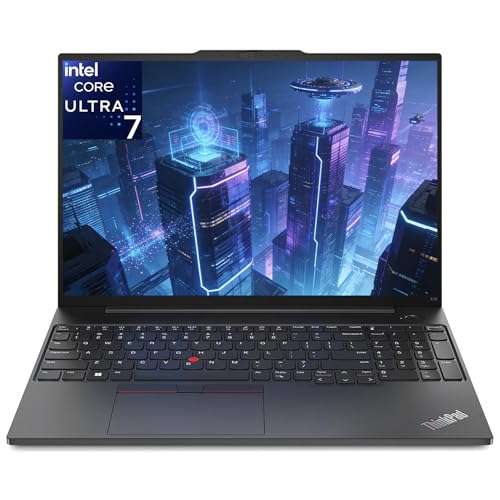 Lenovo ThinkPad E16 (2026 Edition) | Check price on Amazon | |
 Lenovo ThinkPad T14 Gen 6 | Check price on Amazon | |
 Lenovo ThinkPad P14s Gen 6 | Check price on Amazon |
Key takeaways
- Three verified Lenovo ThinkPad laptops for business work and video tasks, compared by screen size, processor, memory, storage and ports.
Disclosure: As an Amazon Associate, we earn from qualifying purchases.
Our top pick: Lenovo ThinkPad E16 (2026 Edition). Runner-up: Lenovo ThinkPad T14 Gen 6.
A mid level business laptop that also has to handle video work needs two things at once: the reliability, keyboard and port selection that office work depends on, and enough processor, memory and graphics headroom for video calls, screen recording, editing and playback. This guide covers three laptops, and all three are Lenovo ThinkPads. That is stated plainly rather than dressed up: when the listings were checked, the verified pool of mid level business laptops with video-capable hardware on Amazon US was thin, and these three ThinkPad models were the ones that could be confirmed with real listings and real ASINs. Rather than padding the guide with gaming laptops, which are built for a different purpose, or Chromebooks, which run a different operating system and software set, this guide sticks to the three verified business models and explains how they differ.
Mid level, as the term is used here, means the ground between basic office laptops and high-end workstations: current-generation processors, DDR5 memory rather than the older DDR4, fast NVMe storage, and screens above the basic HD panels still fitted to entry machines. It is the tier where a laptop stops being a compromise for everyday business software and gains enough headroom for video tasks on top. Buyers in this tier usually keep a machine for several years, so the specification has to absorb growing file sizes and heavier software rather than only today’s workload.
The three machines split by screen size and emphasis. The ThinkPad E16 is a 16-inch model with the strongest video hardware of the three. The ThinkPad T14 Gen 6 is the 14-inch business standard, with a high-resolution webcam and a durability rating. The ThinkPad P14s Gen 6 is a 14-inch mobile workstation on an AMD platform, with the newest wireless standard of the three. All three run Windows 11 Pro, all three have at least 16GB of DDR5 memory and a 512GB NVMe solid-state drive, and all three carry Thunderbolt 4 ports for docking and fast external storage.
Quick Picks
- Lenovo ThinkPad E16 (2026 Edition) — Best for video work: a 16-inch screen, Intel Core Ultra 7 255H, 32GB of memory, a 1TB drive and the Intel Arc 140T integrated GPU, the strongest graphics hardware in this guide.
- Lenovo ThinkPad T14 Gen 6 — Best all-round business pick: a 14-inch FHD+ IPS screen, a 5MP FHD webcam for calls, a fingerprint reader and MIL-STD-810H durability, in the classic T-series format.
- Lenovo ThinkPad P14s Gen 6 — Best mobile workstation option: an AMD Ryzen AI 7 350 with Radeon 860M graphics, Wi-Fi 7 and two Thunderbolt 4 ports in a 14-inch chassis.
Lenovo ThinkPad E16 (2026 Edition)
OUR TOP PICK
The ThinkPad E16 is the top pick for a buyer whose work mixes business tasks with regular video work, because it has the strongest hardware for that second job. As stated on the listing, it is built around an Intel Core Ultra 7 255H processor, 32GB of DDR5 memory and a 1TB solid-state drive, and its graphics come from the Intel Arc 140T integrated GPU. Of the three machines in this guide, that integrated GPU is the strongest video and editing hardware, which matters for timeline playback, effects rendering and exporting finished clips. The 32GB of memory also gives editing software and a browser full of research tabs room to run at the same time, and the 1TB drive holds a working library of project files without constant offloading.
The screen is the other half of the video case. The E16 has a 16-inch FHD+ panel, and the extra width over a 14-inch machine shows up directly in editing software: a longer visible timeline, larger preview window and more room for tool panels without shrinking the footage. For document work, the same screen fits two windows side by side at readable sizes. The listing states Thunderbolt 4 and HDMI among its connections, so the laptop can drive an external monitor for a bigger editing display and still connect fast external drives over Thunderbolt for project media.
The memory and storage figures deserve a closer look, because they decide how the machine ages. With 32GB of DDR5, the E16 can hold an editing project, a video call and the usual spread of office applications in memory at once, without the slowdowns that come from a machine swapping work to the drive. The 1TB drive matters just as much for video: raw footage and exported files accumulate quickly, and a drive that is nearly full slows everything down. On both counts, the E16 is specified well above the minimum a mid level machine needs, and that headroom is a large part of why it leads this guide.
For business use, the E16 runs Windows 11 Pro, which is the edition aimed at managed work environments, with the drive encryption and remote management support that company IT departments usually require. It is a ThinkPad, so the keyboard follows the line’s familiar layout with a pointing stick between the keys, which matters to anyone who types all day. The trade-off for the larger screen and stronger hardware is size: a 16-inch laptop is a desk-first machine, and anyone who travels weekly with a laptop bag should weigh the 14-inch models below before choosing it.
Specs
– Model: Lenovo ThinkPad E16 (2026 Edition)
– Display: 16-inch FHD+, as stated on the listing
– Processor: Intel Core Ultra 7 255H, as stated on the listing
– Memory: 32GB DDR5, as stated on the listing
– Storage: 1TB SSD, as stated on the listing
– Graphics: Intel Arc 140T integrated GPU, as stated on the listing
– Ports: Thunderbolt 4 and HDMI, as stated on the listing
– Operating system: Windows 11 Pro
Pros
– Strongest video hardware in this guide, with the Intel Arc 140T integrated GPU
– 32GB of memory and a 1TB drive, the largest memory and storage figures here
– 16-inch screen gives editing timelines and side-by-side documents more room
Cons
– The 16-inch format is the least portable option in this guide
– No webcam resolution or durability rating was recorded from the listing checked for this guide
Lenovo ThinkPad T14 Gen 6
The ThinkPad T14 Gen 6 is the runner-up, and the model that fits the widest range of business users. The T series is Lenovo’s mainstream business line, and this generation is built around an Intel Core Ultra 5 225U processor with 16GB of DDR5 memory and a 512GB NVMe solid-state drive, as stated on the listing. That combination covers the core of office work — documents, spreadsheets, browser-based tools, email and presentations — with headroom to spare, and the integrated Intel graphics handle video calls, playback and light editing work such as trimming clips and assembling simple projects.
Two details on the listing speak directly to everyday business use. The first is the webcam: a 5MP FHD camera, which is a step above the basic cameras still common on business laptops, and the component that decides how a user looks on client calls and recorded presentations. The second is durability: the listing states MIL-STD-810H, a military test standard for resistance to the knocks, vibration and temperature swings of a working life on the road. A fingerprint reader handles sign-in without a password, and the keyboard is backlit for dim rooms and late flights.
Connectivity is complete for a desk setup. The listing states Wi-Fi 6E wireless and two Thunderbolt 4 ports, so one cable can connect a dock carrying monitors, storage and peripherals, and the second port stays free for a fast external drive. At 14 inches with an FHD+ IPS screen, the T14 is the balanced option in this guide: smaller and easier to carry than the E16, with a better camera and a stated durability rating, but with half the memory and storage of the E16 and integrated graphics that suit light rather than sustained video work. Buyers who edit video daily should look at the E16 first; buyers who edit occasionally and travel often will find the T14 the better fit.
Specs
– Model: Lenovo ThinkPad T14 Gen 6
– Display: 14-inch FHD+ IPS, as stated on the listing
– Processor: Intel Core Ultra 5 225U, as stated on the listing
– Memory: 16GB DDR5, as stated on the listing
– Storage: 512GB NVMe SSD, as stated on the listing
– Graphics: Integrated Intel graphics, as stated on the listing
– Webcam: 5MP FHD, as stated on the listing
– Security and build: Fingerprint reader, backlit keyboard, MIL-STD-810H, as stated on the listing
– Wireless and ports: Wi-Fi 6E, 2x Thunderbolt 4, as stated on the listing
– Operating system: Windows 11 Pro
Pros
– 5MP FHD webcam, the clearest camera specification in this guide, for calls and recording
– MIL-STD-810H durability stated on the listing
– Two Thunderbolt 4 ports and Wi-Fi 6E in a portable 14-inch format
Cons
– 16GB of memory and a 512GB drive are half the E16 figures
– Integrated Intel graphics suit light editing rather than heavy project work
Lenovo ThinkPad P14s Gen 6
The ThinkPad P14s Gen 6 is the mobile workstation of the three, and the option for buyers whose video work is part of a heavier technical workload. As stated on the listing, it runs an AMD Ryzen AI 7 350 processor with Radeon 860M integrated graphics, 16GB of DDR5 memory and a 512GB solid-state drive. The P series is Lenovo’s workstation line, positioned above the mainstream T series for demanding applications, and the Radeon 860M gives this 14-inch machine more graphics capability than the T14’s integrated Intel graphics while keeping the same portable format.
The display is a 14-inch IPS panel at WUXGA resolution, the 16:10 format that shows more vertical content than a standard widescreen panel — useful for timelines, documents and code alike. Connectivity is the most current in this guide: the listing states two Thunderbolt 4 ports and Wi-Fi 7, the newest wireless standard among these three laptops, which pairs with a Wi-Fi 7 router for faster local transfers of large video files. A fingerprint reader covers sign-in, and the operating system is Windows 11 Pro, as on the other two models.
The choice between the P14s and the T14 comes down to platform and workload. Both are 14-inch ThinkPads with 16GB of memory and 512GB drives. The T14 counters with its 5MP webcam and stated MIL-STD-810H rating, which suit a travelling business user. The P14s answers with the AMD platform, stronger integrated graphics and Wi-Fi 7, which suit a user whose laptop spends its days on editing, rendering support work and other sustained tasks. Against the E16, the P14s gives up screen size, memory and storage, so it is the pick when the workstation platform matters more than raw capacity in a mid level machine.
Specs
– Model: Lenovo ThinkPad P14s Gen 6 (mobile workstation)
– Display: 14-inch IPS WUXGA, as stated on the listing
– Processor: AMD Ryzen AI 7 350, as stated on the listing
– Memory: 16GB DDR5, as stated on the listing
– Storage: 512GB SSD, as stated on the listing
– Graphics: Radeon 860M, as stated on the listing
– Wireless and ports: Wi-Fi 7, 2x Thunderbolt 4, as stated on the listing
– Security: Fingerprint reader, as stated on the listing
– Operating system: Windows 11 Pro
Pros
– Workstation-class P-series platform in a 14-inch chassis
– Radeon 860M graphics, stronger than the T14 integrated Intel graphics
– Wi-Fi 7, the newest wireless standard in this guide
Cons
– Same 16GB memory and 512GB storage as the T14, half the E16 figures
– No webcam resolution was recorded from the listing checked for this guide
How to Choose
Start with the screen. A 16-inch display, like the E16, makes video timelines, preview windows and side-by-side documents easier to work with, and suits a laptop that mostly lives on one desk. A 14-inch display, like the T14 and P14s, fits a laptop bag properly and is the better choice for anyone who moves between offices, sites and home working.
Next, match the graphics and processor to the video work involved. All three machines handle video calls, playback and streaming without difficulty. For editing, the E16’s Intel Arc 140T integrated GPU is the strongest hardware here, followed by the P14s and its Radeon 860M; the T14’s integrated Intel graphics are aimed at light editing. Longer, effects-heavy projects will run better on the stronger hardware, whatever the screen size.
Then look at memory and storage together. Video files are large, and editing software holds a lot in memory. The E16’s 32GB of memory and 1TB drive are the most comfortable figures in this guide for active project work. The 16GB and 512GB in the T14 and P14s are a sound mid level specification for business work with occasional video, but a buyer with a growing media library should plan on external storage over Thunderbolt 4, which all three machines support.
Check the camera and the ports before deciding. Video calls are business work now, and the T14’s 5MP FHD webcam is the clearest camera specification recorded here. For a desk setup, Thunderbolt 4 ports allow a single dock to carry monitors and drives; the E16 adds HDMI for a direct monitor connection, and the P14s adds Wi-Fi 7 for the fastest wireless transfers when the router supports it.
Consider the operating system and software fit as well. All three machines run Windows 11 Pro, so the standard Windows business applications, video conferencing tools and editing software a mid level buyer expects will install and run without the compatibility questions that come with other platforms. Pro edition features such as drive encryption matter to anyone carrying client footage or company documents, because a lost laptop should not become a lost archive.
Finally, weigh durability and sign-in. The T14’s stated MIL-STD-810H rating suits a laptop that travels and gets handled daily. Fingerprint readers on the T14 and P14s make sign-in quicker than a typed password, which adds up across a working day.
FAQs
Are these laptops suitable for video editing as well as video calls?
Yes, within the limits of integrated graphics. All three handle calls, playback and light editing. The E16, with its Intel Arc 140T integrated GPU, 32GB of memory and 1TB drive, is the strongest editing machine in this guide, and the P14s with Radeon 860M graphics follows it. None of the three is a gaming laptop or a dedicated editing workstation with a discrete graphics card, so very heavy projects with many effects will take longer than they would on that class of hardware.
Why does this guide only include Lenovo ThinkPad laptops?
Because those were the mid level business laptops with video-capable hardware whose Amazon US listings could be verified when this guide was prepared. The verified pool was thin, and the guide lists the confirmed models rather than filling the space with gaming laptops, which are built for a different purpose, or Chromebooks, which cannot run the standard Windows business software these buyers need. All three picks are business laptops running Windows 11 Pro.
Which of these laptops is best for travelling business users?
The two 14-inch models. The T14 Gen 6 pairs its portable format with a 5MP FHD webcam for calls from anywhere and a stated MIL-STD-810H durability rating, which makes it the natural travel pick. The P14s Gen 6 is the alternative for travellers whose work is heavier, with its workstation platform, Radeon 860M graphics and Wi-Fi 7. The 16-inch E16 is better kept as a desk machine with occasional trips.
Conclusion
For a mid level business laptop that also handles regular video work, the Lenovo ThinkPad E16 is the top pick: the largest screen here, the most memory and storage, and the Intel Arc 140T integrated GPU for editing. The ThinkPad T14 Gen 6 is the runner-up and the best all-round business choice, with its 5MP webcam, MIL-STD-810H rating and portable 14-inch format. The ThinkPad P14s Gen 6 suits buyers who want a mobile workstation platform with Radeon 860M graphics and Wi-Fi 7. Before buying, confirm the screen size against how the laptop will actually be carried and used, and check the listing for the exact configuration, since memory and storage can vary between listings of the same model line.