Key takeaways
- Only a handful of true 8TB portable SSDs exist. Compare the verified bus-powered USB-C picks for on-location video offloads, sustained writes and field use.
Disclosure: As an Amazon Associate, we may earn from qualifying purchases made through links on this page, at no additional cost to you.

A single day of multi-camera location shooting can generate terabytes of footage. Two bodies recording 4K ProRes, a third shooting high-frame-rate B-roll and a drone card on top will fill a 2TB or 4TB drive before the wrap call, and swapping small drives mid-shoot is how cards get mixed up and clips get lost. That is why working videographers keep asking for a portable SSD that holds a full production in one place: a true 8TB drive that runs off bus power, survives a location bag, and writes fast enough to clear cards between setups.
Here is the honest starting point: true 8TB portable SSDs are rare. Most products that appear when you search for an 8TB SSD are internal M.2 or 2.5-inch drives that need an enclosure or a computer bay, desktop drives that need a wall adapter, or portable lines whose largest model stops at 4TB. After checking the current Amazon US listings, only a short list of bus-powered, pocketable drives genuinely ship in an 8TB capacity. This guide covers the verified ones, explains how they differ, and is upfront about how thin this category still is.
Quick Picks
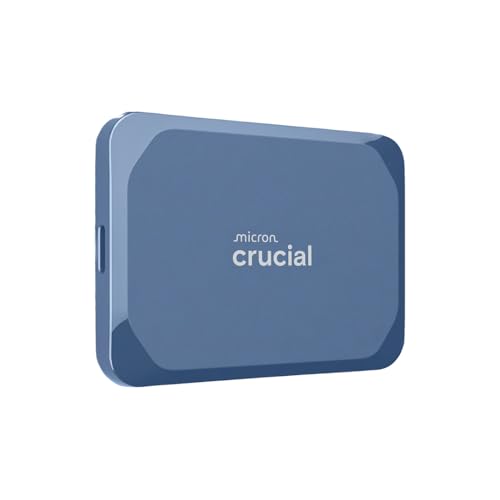
- Fastest mainstream pick: Crucial X10 8TB — headline speeds up to 2,100MB/s over a 20Gbps USB connection, in a 32-gram shell with IP65 sealing.
- Rugged all-rounder: SanDisk 8TB Extreme Portable SSD — 1,050MB/s reads and 1,000MB/s writes over USB 3.2 Gen 2, with IP65 resistance, drop protection and hardware encryption.
- Thunderbolt speed pick: Oyen Digital U34 Bolt 8TB — a USB4 40Gbps portable rated up to 2,800MB/s for Thunderbolt hosts that can use the extra bandwidth.
Crucial X10 8TB Portable SSD (ASIN: B0F336NLC7)
The Crucial X10 in its 8TB size (model CT8000X10SSD9-02) is the fastest of the widely available 8TB portables. Its listing rates transfer speeds up to 2,100MB/s over USB-C, and the drive uses a USB 3.2 Gen 2×2 interface, which means you only see the top speeds on a host with a 20Gbps USB port — still uncommon on laptops, and absent from current Macs, where the drive runs at 10Gbps-class speeds. Even so, for Windows workstations and newer PCs with Gen 2×2 ports, it clears full camera cards noticeably faster than 10Gbps drives during end-of-day offloads.
The hardware is built for a location bag. The X10 weighs just 32 grams, measures roughly 65 x 50 x 10 mm, and carries an IP65 dust and water resistance rating with drop protection rated to 9.8 feet (3 meters). It ships with a USB-C to USB-C cable, works across Windows, Mac, Linux and Android hosts, and is backed by a 3-year limited warranty. For video crews, the practical appeal is simple: one tiny drive that can swallow a full day of footage from several cameras and still fit in a shirt pocket.
Highlights
– True 8TB capacity in a bus-powered portable enclosure, confirmed on the listing
– Up to 2,100MB/s headline speed over USB 3.2 Gen 2×2 (20Gbps)
– IP65 sealing and drop protection rated to 9.8 feet
– Only 32 grams — the lightest drive in this guide
– USB-C to USB-C cable included in the box
Considerations
– Full speed needs a 20Gbps USB host; on 10Gbps ports and Thunderbolt-only Macs it runs at the lower rate
– Crucial headlines read performance; for very long continuous writes, plan offload time with headroom rather than assuming peak numbers
– No hardware encryption is listed, so use software encryption if your production requires it
SanDisk 8TB Extreme Portable SSD (ASIN: B0DLK38TR9)
SanDisk’s Extreme Portable SSD line is one of the few portable ranges that actually reaches 8TB, in this model SDSSDE61-8T00-G25. It is rated for read speeds up to 1,050MB/s and write speeds up to 1,000MB/s over a USB-C, USB 3.2 Gen 2 (10Gbps) connection. That interface is slower on paper than the Crucial above, but it has a practical advantage on location: every modern laptop, tablet and camera-side offload station supports 10Gbps USB, so the SanDisk delivers its full rated speed on almost any host you plug it into, including Macs.
Durability is the other half of its pitch. The listing describes IP65 water and dust resistance, drop protection rated up to 3 meters, a silicone shell with a carabiner loop for clipping the drive to a bag, and 256-bit AES hardware encryption for productions that need footage locked down. SanDisk backs it with a 5-year limited warranty, the longest coverage in this guide. For a DIT or a solo shooter offloading cards at night in a hotel room or a production tent, that combination of predictable speed, sealing and warranty is exactly what matters.
Highlights
– True 8TB capacity (model SDSSDE61-8T00-G25), confirmed on the listing
– Up to 1,050MB/s read and 1,000MB/s write over USB 3.2 Gen 2
– IP65 water and dust resistance, drop protection up to 3 meters
– 256-bit AES hardware encryption
– 5-year limited warranty and a carabiner loop for bag carry
Considerations
– The 10Gbps interface caps offload speed well below the 20Gbps and USB4 drives here
– The faster Extreme PRO line stops at 4TB, so there is no 8TB step-up inside SanDisk’s own range
– Physical size is larger than the Crucial X10, though still pocketable
Oyen Digital U34 Bolt 8TB (ASIN: B0GXGMLWS2)

Oyen Digital builds storage for media professionals rather than the mass market, and the U34 Bolt is its answer for crews who offload over Thunderbolt. This 8TB portable uses a USB4 40Gbps interface on a USB-C connector, works with Thunderbolt 4 and Thunderbolt 3 hosts, and is rated for speeds up to 2,800MB/s — comfortably the highest ceiling in this guide. On a Thunderbolt-equipped Mac or PC, that translates into the shortest card-offload windows of the three drives here, which matters when a camera team is waiting on cleared media before the next setup.
The U34 Bolt is a bus-powered NVMe portable, so it runs entirely from the host port with no wall adapter — a requirement for true location work, and the feature that separates it from the many 8TB desktop drives that show up in search results. Oyen Digital sells the drive in several capacities, and the 8TB configuration is the one to check carefully at purchase, since the smaller sizes share the same product family and similar listings.
Highlights
– True 8TB capacity in a bus-powered portable design
– USB4 40Gbps interface with Thunderbolt 4/3 compatibility
– Rated up to 2,800MB/s — the fastest ceiling in this guide
– Built by a specialist storage maker focused on media workflows
Considerations
– You need a Thunderbolt or USB4 host to benefit; on plain USB ports it falls back to USB speeds
– A smaller specialist brand means a smaller support footprint than SanDisk or Crucial
– Confirm the 8TB variant is selected before ordering, as capacities share the listing family
How to Choose
Start with capacity honesty. An 8TB label should mean 8TB of internal flash in a portable enclosure, not a desktop box and not a bare internal drive. If a listing is for an M.2 stick or a 3.5-inch desktop unit, it is not a portable SSD no matter how the search result is worded. Also note that formatted capacity is always lower than the headline number, because 8TB is measured in decimal terabytes; your operating system will report roughly 7.27 TiB, and that is normal, not a fault.
Next, match the interface to your fastest host. USB4 and Thunderbolt drives only reach their rated speeds on Thunderbolt or USB4 ports. USB 3.2 Gen 2×2 (20Gbps) drives need that specific port, which many laptops still lack. A 10Gbps USB 3.2 Gen 2 drive is the slowest on paper but the most predictable, because it runs at full speed almost everywhere. Buying a faster interface than every machine you own is wasted money; buying a slower one than your main offload station creates a daily bottleneck.
Then think about sustained writes, not headline speeds. Offloading a full 512GB or 1TB camera card is a long continuous write, and compact drives slow down once their cache is exhausted or the enclosure heats up. For direct-to-drive recording and all-day offload cycles, favor drives in metal or well-vented enclosures, keep them out of direct sun and off hot surfaces, and leave working headroom in your schedule instead of planning around peak benchmark numbers.
Finally, weigh ruggedness and data protection. IP65 sealing and multi-meter drop ratings matter when a drive lives in a camera bag, gets clipped to a belt, or works on dusty and wet locations. Hardware encryption matters when client footage cannot leave the set unprotected. And whatever drive you choose, it is a copy, not a backup: an 8TB drive holding the only version of a shoot is a single point of failure, so plan a second destination for anything irreplaceable.
Key Specifications Explained
Interface bandwidth. USB 3.2 Gen 2 runs at 10Gbps (about 1,050MB/s in practice), Gen 2×2 doubles that to 20Gbps, and USB4 reaches 40Gbps. The drive and the host both have to support a given rate, and the slower side wins. Thunderbolt 3, 4 and 5 ports accept USB-C drives, but a Gen 2×2 drive connected to a Thunderbolt-only host typically drops to 10Gbps.
Read vs. write speed. Listings headline the best number, which is usually sequential read. Video offload is a write workload, so compare rated write speeds where the maker publishes them, and treat a missing write figure as a question to resolve before buying.
Sustained write and cache. Portable SSDs use a fast cache that absorbs short bursts. Once a very long copy fills it, speed settles to the native flash rate until the copy ends. This is normal behavior, and it is why a drive that benchmarks brilliantly on a 1GB test can feel slower across a 900GB card dump.
IP rating and drop rating. IP65 means dust-tight and protected against water jets — enough for rain, dust and location grime, not for submersion. Drop ratings are measured to a specified height onto a hard surface; they describe survival odds, not a guarantee, and they assume the drive is not writing at the moment of impact.
Bus power. A bus-powered drive draws all its power from the USB-C port. That is what makes it usable in the field with a laptop or tablet. If a drive ships with a required wall adapter, it is a desktop drive, whatever the marketing calls it.
Setup and Use Tips
Format the drive for your workflow before the shoot, not on location. exFAT is the practical default for drives that move between Mac and Windows machines and need to hold individual video files larger than 4GB. If the drive will only ever touch one operating system, that system’s native format is slightly more robust.
Adopt a fixed offload routine: copy the card, verify the copy with checksums using your offload software, and only then format the card in the camera. Keep the folder structure identical to the card’s original layout so your editing software relinks without drama. Label the physical drive and match the label to the volume name, so a bag full of identical black drives stays manageable.
Keep the drive cool during long copies. Set it on a hard, shaded surface with air around the enclosure, and avoid stacking drives on top of each other mid-offload. Use the cable that came with the drive or a certified short cable rated for the interface speed; a random charging cable is a common cause of a fast drive mysteriously running at USB 2.0 speeds.
For direct recording from cameras that support USB-C media, test the exact camera, cable and drive combination at your highest bitrate before the production day, and record a full-card-length test clip. Compatibility lists change with firmware, and the time to discover a dropped-frame problem is before the shoot, not during it.
Common Mistakes to Avoid
- Buying a desktop or internal drive by accident. Search results for 8TB SSDs are dominated by internal M.2 drives and wall-powered desktop units. Check that the listing describes a portable, bus-powered enclosure before ordering.
- Assuming a product line’s smaller sizes prove an 8TB exists. Several famous portable lines stop at 4TB. Always confirm the exact capacity variant on the listing itself.
- Paying for bandwidth your hosts cannot use. A USB4 drive on a 10Gbps laptop behaves like a 10Gbps drive. Audit your ports first.
- Treating one big drive as a backup strategy. Eight terabytes of footage on a single drive is eight terabytes at risk. Mirror to a second drive or the cloud as soon as the day allows.
- Formatting cards before verification. The card is your backup until the copy is verified. Never break that order under time pressure.
- Ignoring heat on long writes. A drive baking in a closed car or sitting on a hot laptop will throttle or disconnect. Shade and airflow are free performance.
FAQ
How many true 8TB portable SSDs are there?
Very few. As this guide’s research shows, the verified bus-powered options on Amazon US can be counted on one hand: the Crucial X10, the SanDisk Extreme Portable SSD and the Oyen Digital U34 Bolt are the confirmed 8TB portables, while many better-known portable lines still stop at 4TB.
Is 8TB overkill for video work?
For a single camera shooting compressed 4K, probably. For multi-camera ProRes or RAW workflows, a 6K or 8K production, or a full documentary trip without a base station, 8TB is the difference between rotating small drives every evening and carrying the whole production on one device.
Will an 8TB portable SSD work with my camera for direct recording?
Some cameras record to USB-C SSDs, but support is model- and firmware-specific, and not every drive is approved. Check your camera maker’s current compatibility list and test your exact combination before relying on it on a shoot.
Why does my computer show less than 8TB?
Drive makers measure capacity in decimal units (1TB = 1,000,000,000,000 bytes), while operating systems report binary units. An 8TB drive therefore appears as about 7.27TB in your file manager. Every drive in this guide behaves the same way.
Which interface should I choose for a Mac-based workflow?
Macs support Thunderbolt and 10Gbps USB, but not USB 3.2 Gen 2×2 at 20Gbps. A USB4/Thunderbolt drive such as the U34 Bolt uses a Mac’s full bandwidth, while a Gen 2×2 drive like the Crucial X10 will run at 10Gbps-class speeds on a Mac despite its higher rating on paper.
Final Verdict
The 8TB portable SSD category is real but tiny, and that scarcity shapes the recommendation. For most location video shooters, the SanDisk 8TB Extreme Portable SSD is the safest default: full rated speed on almost any host, strong sealing and drop protection, hardware encryption and the longest warranty here. If your offload station has a 20Gbps USB port, the Crucial X10 8TB is faster and far smaller, and it is the easiest drive in this guide to carry everywhere. If your workflow is Thunderbolt-based and offload time is the bottleneck, the Oyen Digital U34 Bolt 8TB offers the highest ceiling of the three.
Whichever you choose, verify the exact 8TB variant on the listing before ordering, test it with your own cameras and hosts as soon as it arrives, and pair it with a second copy destination. In a category this small, the right drive is the one that matches your ports, survives your locations, and never holds the only copy of the day.