Key takeaways
- Three hot-swap enterprise SSDs with power-loss protection verified on Amazon US: data center SATA drives with hold-up capacitors, endurance and QoS checks.
As an Amazon Associate we earn from qualifying purchases.
Two features separate an enterprise SSD from a fast consumer drive, and this keyword names both of them. Hot-swap support means the drive is built for a front-accessible bay on a backplane, so a failed or ageing unit can be pulled and replaced while the server keeps running. Power-loss protection means the drive carries its own hold-up capacitors, so when power disappears mid-write, the data already acknowledged to the host is flushed from volatile cache to NAND instead of vanishing. A drive missing either feature does not belong in this category, whatever its speed figures say.


The three drives below are data center SATA SSDs sold on Amazon US whose product information confirms the enterprise design and the power-loss protection circuit. All three use the 2.5-inch form factor that standard hot-swap bays are built around, and all three publish the endurance and consistency figures that matter in a server: drive writes per day, steady-state IOPS and quality-of-service behaviour. They differ in emphasis: Kingston’s DC600M is the mixed-use all-rounder, Micron’s 5400 PRO is the read-intensive boot and tiering drive with the longest track record in this form factor, and Samsung’s PM893 is the high-capacity option at the top of the range.
Disclosure: This article contains affiliate links. If you buy through these links, we may earn a commission at no additional cost to you.
How to Choose a Hot-Swap Enterprise SSD with Power-Loss Protection
Verify the power-loss protection is hardware-based
Real power-loss protection is a physical circuit: capacitors on the drive’s board store enough charge to finish writing cached data to NAND when the supply fails. Look for the wording on the product page: power loss protection, power hold-up circuit, or hold-up capacitors. Firmware-only claims and vague references to data protection are not the same thing. The protection covers data in flight and the drive’s own mapping tables, which is why an enterprise drive re-initialises cleanly after an outage while a consumer drive may lose the last writes or, in the worst case, its file system.
Match the form factor and interface to your backplane
Hot-swap is a property of the bay as much as the drive. The standard is the 2.5-inch drive on a SATA or SAS backplane with a carrier, and all three drives here are 2.5-inch SATA units 7 mm thick, which fit the carriers used in mainstream rack servers. SATA is the right choice when the backplane and cabling already exist and the workload is boot, logging, read-heavy tiering or general mixed use. If your chassis is built for U.2 NVMe, these drives will not fit it; if it is built for SATA, they drop in without changes to anything else in the storage path.
Read the endurance figure in DWPD, not just terabytes
Endurance is published two ways: total terabytes written over the warranty, and drive writes per day, which normalises that figure by capacity and time. For comparison across capacities, DWPD is the honest number. Read-intensive enterprise drives sit around 1 to 1.5 DWPD; mixed-use drives publish similar or higher figures with latency consistency tuned for write-heavy duty. Match the class to the workload: a boot drive that mostly reads is wasted as a mixed-use unit, and a logging target that writes all day will wear a read-intensive drive early.
Check latency consistency and enterprise firmware features
Servers care about the slowest responses, not the average. Enterprise drives publish quality-of-service figures, typically the 99.999th percentile latency, because a storage tier is only as predictable as its worst behaviour under load. Also confirm the supporting features that fleet management depends on: enterprise SMART attributes for wear and temperature reporting, end-to-end data path protection, and, where compliance requires it, self-encryption standards such as TCG Opal. These are the details that make a drive manageable across hundreds of bays rather than merely fast in one.
The 3 Best Hot-Swap Enterprise SSDs with Power-Loss Protection
1. Kingston DC600M Enterprise SATA SSD, 1.92TB
The DC600M is Kingston’s fourth-generation data center SATA drive, built on 3D TLC NAND and aimed at mixed-use server workloads. The Amazon product description states the two things this guide cares about directly: the drive is designed for data center environments, and it carries on-board power loss protection via hold-up capacitors, designed to protect data against unexpected power failure and to ensure the drive re-initialises successfully on the next power-up. Kingston’s specification for the series also lists the drive as hot-plug capable, which is the drive-side requirement for hot-swap bays.
Around that core, the series is specified the way a fleet drive should be: capacities from 480GB to 7.68TB in one family, so the same qualification covers boot drives and capacity tiers; a 1 DWPD endurance class over the five-year warranty; enterprise SMART tooling for reliability tracking, usage statistics and life remaining; and published latency and IOPS consistency aimed at system integrators and cloud providers. The 1.92TB model listed here is the middle of the range and the natural default for a mixed-use volume.
Key specifications from the product information:
- Capacity: 1.92TB (series spans 480GB to 7.68TB)
- Form factor and interface: 2.5-inch, SATA 6Gb/s
- NAND: 3D TLC
- Power-loss protection: on-board, via hold-up capacitors
- Hot-swap use: hot-plug capable per the manufacturer’s specification
- Endurance: 1 DWPD class, five-year warranty
- Monitoring: enterprise SMART tools
View the Kingston DC600M 1.92TB on Amazon
Best for: Mixed-use server volumes where one qualified drive family has to cover everything from boot to general data duty.
Watch out for: This listing is for the DC600M, which does not include encryption; the encrypted variant in the same family is the DC600ME with AES 256-bit and TCG Opal 2.0, so confirm the exact model suffix if your compliance rules require a self-encrypting drive.
2. Micron 5400 PRO Enterprise SATA SSD, 1.92TB
The 5400 PRO is Micron’s data center SATA line built on 176-layer NAND, and its Amazon product page is unusually explicit about the two qualifying features: the specification list states Hot Pluggable: Yes, and the feature list describes power loss signal support and a power hold-up circuit that helps protect data in flight and data at rest, alongside enterprise data path protection. For a buyer checking this category’s requirements, this is the clearest product page of the three.
The drive is classed read intensive at 1.5 DWPD, with published figures of up to 540 MB/s sequential read and 520 MB/s sequential write, 95,000 random read IOPS and 33,000 random write IOPS. Security options include AES 256-bit hardware encryption with TCG Enterprise and Opal 2.0 variants, and Micron’s Storage Executive tooling supports fleet maintenance. In practice this is the boot-drive and read-tier specialist of the group: the one to standardise on for operating system volumes, virtualisation datastores with read-heavy profiles, and content tiers where predictable reads matter more than write endurance.
Key specifications from the product information:
- Capacity: 1.92TB
- Form factor and interface: 2.5-inch internal, SATA/600
- NAND: 176-layer 3D TLC
- Power-loss protection: power loss signal support and power hold-up circuit
- Hot-swap use: listed as hot pluggable on the product page
- Endurance: 1.5 DWPD, read intensive class
- Performance: up to 540 MB/s read, 520 MB/s write; 95K random read IOPS
- Security: AES 256-bit encryption, TCG Enterprise and Opal 2.0 options
View the Micron 5400 PRO 1.92TB on Amazon
Best for: Boot volumes and read-intensive tiers in servers with SATA hot-swap bays, and for buyers who want both qualifying features stated plainly on the product page.
Watch out for: The read-intensive class suits read-heavy duty; a sustained write-heavy workload will consume its endurance budget faster than the mixed-use Kingston, so size the class to the workload rather than to the capacity alone.
3. Samsung PM893 Enterprise SATA SSD, 7.68TB
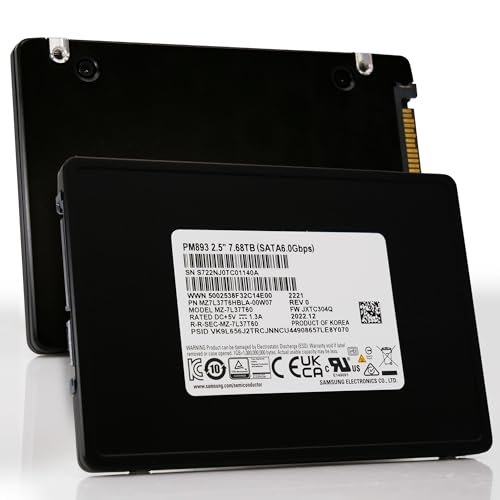
The PM893 is Samsung’s mainstream data center SATA line, and this listing is its largest capacity: 7.68TB in the same 2.5-inch, 7 mm format as the other drives here. The Amazon product information describes it as an enterprise-grade solid state drive designed for demanding enterprise applications and data center storage, built on Samsung V-NAND TLC with a SATA 6Gb/s interface and sequential figures of 550 MB/s read and 520 MB/s write.
Power-loss protection is a documented feature of the PM893 series: Samsung specifies power-loss safeguards and end-to-end data protection for the line, and the protection is capacitor-based, flushing cached data to NAND on a sudden power cut. The series is rated at 1 DWPD over five years with a two-million-hour MTBF, and it adds AES 256-bit hardware encryption with TCG Opal support. The reason to choose this listing over the other two is density: nearly eight terabytes per bay multiplies the capacity of an existing SATA chassis without touching the backplane, cabling or controllers.
Key specifications from the product information:
- Capacity: 7.68TB
- Form factor and interface: 2.5-inch, SATA 6Gb/s (Serial ATA-600)
- NAND: Samsung V-NAND TLC
- Power-loss protection: capacitor-based, specified for the PM893 series
- Performance: up to 550 MB/s read, 520 MB/s write
- Endurance: 1 DWPD class over five years; MTBF two million hours
- Security: AES 256-bit encryption, TCG Opal support
- Model number: MZ7L37T6HBLA
View the Samsung PM893 7.68TB on Amazon
Best for: Capacity upgrades in existing SATA hot-swap chassis, where the largest drive per bay extends the life of the current platform.
Watch out for: The PM893 is an OEM data center drive sold as a bare unit, so expect tray packaging without a retail box or carrier; confirm your server’s carrier and the exact part number against your platform’s compatibility list before ordering in quantity.
Comparison Table
| Model | Capacity | Interface | Endurance class | Power-loss protection | Hot-swap evidence | ASIN |
|---|---|---|---|---|---|---|
| Kingston DC600M | 1.92TB | SATA 6Gb/s | 1 DWPD, mixed use | On-board hold-up capacitors | Hot-plug capable per manufacturer specification | B0C4BJP2H8 |
| Micron 5400 PRO | 1.92TB | SATA/600 | 1.5 DWPD, read intensive | Power hold-up circuit | Listed as hot pluggable on the product page | B0B7NS3QC3 |
| Samsung PM893 | 7.68TB | SATA 6Gb/s | 1 DWPD | Capacitor-based, series specification | 2.5-inch data center drive for standard server bays | B0DH3DFFND |
Frequently Asked Questions
What does power-loss protection actually protect?
It protects the data the drive has already acknowledged but not yet written permanently: the contents of the volatile cache and the drive’s mapping information. When power fails, the hold-up capacitors supply enough energy to flush that data to NAND in an orderly way. It does not protect data still in the host’s memory, and it is not a substitute for backups or redundant power in the rack; it removes one specific and common cause of corruption and lost writes.
Can I hot-swap these drives in any server?
You can hot-swap them in a server whose bays and backplane are designed for it, which is the standard arrangement in rack servers with front-accessible 2.5-inch bays and the correct carriers. The drive must also be presented to the operating system or RAID controller in a way that tolerates removal, which is a platform configuration matter. If your chassis has internal-only bays, no drive can make it hot-swappable.
Why are all three picks SATA rather than NVMe?
Because the hot-swap installed base is SATA. A large share of running servers use 2.5-inch SATA backplanes, and an enterprise SATA drive with power-loss protection upgrades those machines without new backplanes, cables or controllers. NVMe U.2 drives are faster and also exist with power-loss protection, but they only fit chassis built for them; this guide covers the drives that fit the bays most servers already have.
How do I choose between read-intensive and mixed-use?
Look at what the volume actually does. Operating system volumes, hypervisor datastores with mostly-read profiles and content tiers are read-intensive work, and a 1.5 DWPD read-intensive drive like the Micron is built for them. Logging targets, databases with sustained writes and general-purpose volumes belong on a mixed-use class like the Kingston. The Samsung competes on capacity per bay at a 1 DWPD class suitable for read-leaning bulk storage.
Does power-loss protection remove the need for a UPS?
No. The capacitors protect the drive’s own cached data for the milliseconds needed to flush it. A UPS protects the whole system, gives the operating system time to shut down cleanly, and covers the data still in host memory. The two protections operate at different layers, and a serious deployment uses both.
Conclusion
Standardise on the Micron 5400 PRO if your bays mostly hold boot and read-heavy volumes and you want the qualifying features stated most plainly. Choose the Kingston DC600M for mixed-use duty across a fleet, where one drive family spanning many capacities simplifies spares and qualification. Choose the Samsung PM893 when the goal is maximum capacity per existing SATA bay. Whichever you pick, confirm the power-loss protection wording, the endurance class and the exact part number on the product page before ordering, and check the drive against your server platform’s compatibility list, because enterprise drives are qualified per platform in a way consumer drives are not.