Key takeaways
- Compare enterprise SATA SSDs for large file workflows, weighing endurance, power loss protection and capacity for media, ingest and archive tiers.
Moving multi-gigabyte video masters, disk images and backup sets exposes a weakness that small-file benchmarks hide: a drive either sustains long sequential transfers hour after hour, or throughput sags and jobs overrun their windows. The real decision is matching endurance class and capacity to how much data your team writes, moves and rewrites every day. Capacity per bay, write tolerance and behaviour during a sudden power cut all pull in different directions, and filling a chassis cheaply is rarely the safest option.

This guide is for IT buyers, media facility engineers and archive managers refreshing SATA-based servers rather than redesigning them around a new interface. Each shortlisted drive is an enterprise model taken from its Amazon listing, chosen for data center positioning, stated workload class and the capacity points that large file workflows actually consume.
Quick Picks
As an Amazon Associate we earn from qualifying purchases
| Product | Best for | Key spec |
|---|---|---|
| Samsung PM893 7.68TB | Dense media libraries and archive tiers in existing SATA bays | 7.68 TB capacity |
| Kingston DC600M 1.92TB | Mixed read and write ingest servers that cannot risk a power event | On-board power loss protection |
| Micron 5400 PRO 1.92TB | Read-heavy content delivery and shared project storage | 540 MB/s maximum read transfer rate |
| Intel D3-S4520 7.68TB | Legacy server refreshes needing maximum capacity per bay | 550 MB/s read speed |
How to Choose
Endurance Class and Daily Write Load
Large file work feels gentle because transfers are sequential, yet the totals add up quickly when a rendering farm checkpoints scenes or a backup target absorbs a full nightly set. Start by estimating how many terabytes your servers write on an ordinary day, then compare that figure with the workload class in each listing. Read-intensive models suit delivery and archive reading, while mixed-use models tolerate balanced ingest and rewriting. Choosing a class below your real write load shortens service life even when headline capacity looks generous, so treat endurance as a sizing input, not a footnote.
Sustained Sequential Throughput
Every SATA drive here works within the same 6Gb/s interface ceiling, so small differences in listed read and write figures matter less than whether performance holds during a three-hour transfer. Listings that publish both sequential directions give you a clearer picture for workflows that write as heavily as they read, such as ingest stations capturing camera originals. Where a listing only states a read figure, plan conservatively and assume writes will be the slower direction. Also remember that a single drive rarely saturates a busy server alone; arrays of modest drives often deliver steadier aggregate throughput than one flagship unit.
Power Loss Protection and Data Integrity
A consumer drive can lose its mapping table or the tail of a large file when power drops mid-write, turning a nearly finished transfer into a restart. Enterprise listings address this with hold-up capacitors or power loss signal support that lets the drive finish writing data already in flight. For shared storage, that protection guards the files everyone else depends on, not just one workstation. Check the exact wording on the listing you buy, because protection varies between product families and sometimes between capacities. Pairing protected drives with a UPS still matters; the two safeguards cover different failure moments.
Capacity Planning and Bay Economics
Filling a chassis with 7.68 TB drives reduces the number of bays, cables and failure points needed for a given library size, which simplifies older servers that cannot add enclosures. Smaller capacities around 1.92 TB make sense where arrays spread data across many spindles for redundancy or where only a working set needs flash speed. Think in terms of usable capacity after your chosen RAID level, not raw totals on the box. Leaving meaningful free space also helps any SSD maintain steadier write behaviour during long transfers, so avoid speccing a tier that runs permanently near full.
The 4 Best Options
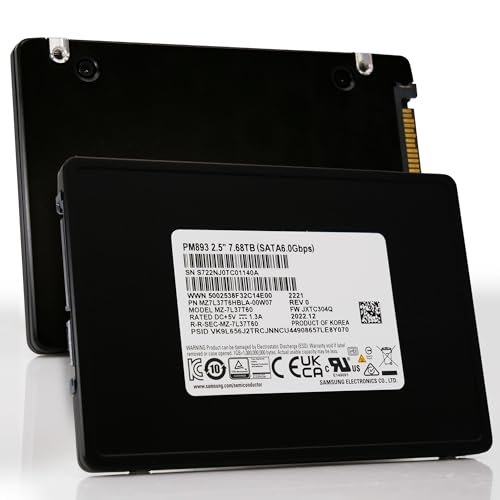
Samsung PM893 7.68TB
Facilities consolidating sprawling media libraries onto fewer bays will appreciate this drive most. Its listing positions it squarely for data center storage, pairing the joint-largest capacity in this roundup with a read figure that keeps large sequential pulls moving. The 7mm height suits dense 2.5-inch carriers, and the self-encrypting drive designation in the listing title speaks to shops with encryption requirements. For archive tiers that are written once and read often, that combination of density and enterprise positioning is difficult to match inside a SATA-only chassis.
Specs
- Capacity: 7.68 TB
- Model number: MZ7L37T6HBLA
- Interface: SATA 6Gb/s, Serial ATA-600
- Form factor: 2.5 inches, 7mm
- Read speed: 550 MB/s
- NAND: Samsung V-NAND TLC
- Endurance positioning: 1 DWPD, per the listing title
- Specific uses for product: Data Center Storage
Best for: Media archives and video libraries outgrowing smaller drives bay by bay.
Watch out for: Confirm your backplane and carrier accept 7mm drives and that the seller supplies the exact MZ7L37T6HBLA model, not a smaller PM893 capacity.
ASIN: B0DH3DFFND
Kingston DC600M 1.92TB
Ingest servers that capture all day and serve files all night need balance rather than a single headline number, and Kingston builds this model explicitly for mixed-use server workloads. The listing highlights on-board power loss protection via hold-up capacitors, which protects transfers interrupted by an outage, alongside design goals of low latency and IO consistency for data center deployments. At 1,920 GB it fits working-set tiers where data turns over frequently and endurance discipline matters more than sheer room. Teams standardising on one mixed-use drive across many nodes will find its positioning easy to justify.
Specs
- Capacity: 1,920 GB
- Model: SEDC600M/1920G
- Interface: Data center SATA 3.0, 6Gbps
- Form factor: 2.5 inches
- NAND: 3D TLC
- Workload class: Mixed use
- Power loss protection: On-board, via hold-up capacitors
Best for: Ingest and general-purpose server tiers with balanced reading and writing.
Watch out for: The listing gives no sequential transfer figures, so size expectations around the SATA interface and verify the SEDC600M/1920G part number at checkout.
ASIN: B0C4BJP2H8
Micron 5400 PRO 1.92TB

Shared project storage and content delivery nodes read far more than they write, which is exactly the profile Micron states for this read-intensive model. Its listing is unusually complete, publishing sequential figures in both directions plus random performance, an endurance rating and enterprise data path protection. AES 256-bit encryption with TCG Enterprise and Opal 2.0 options covers shops that manage keys centrally, while power loss signal support with a hold-up circuit protects data in flight. Hot-pluggable support also suits front-bay servers where a failed drive must be swapped without downtime.
Specs
- Capacity: 1.92 TB
- Series: 5400 Pro
- Interface: SATA/600
- Form factor: 2.5 inches
- Maximum read transfer rate: 540 MB/s
- Maximum write transfer rate: 520 MB/s
- Random 4KB read: 95,000 IOPS
- Random 4KB write: 33,000 IOPS
- Endurance: 1.5 DWPD, read intensive, per the listing
- Encryption: AES 256-bit, TCG Enterprise and Opal 2.0 options
- Hot pluggable: Yes
Best for: Read-heavy delivery, reference libraries and shared storage that serves many clients.
Watch out for: Read-intensive positioning means sustained heavy rewriting belongs on a mixed-use model instead, so audit your write totals before standardising on it.
ASIN: B0B7NS3QC3
Intel D3-S4520 7.68TB

Organisations stretching older SATA servers for a few more years get the most from this high-capacity data center drive. The D3-S4520 series was built to replace hard disks in legacy infrastructure, and this 7.68 TB variant packs the largest libraries into bays that already exist, with 256-bit encryption listed among its features. Sequential figures reproduced from its Amazon listing data sit close to the practical SATA ceiling, which is what long backup and restore jobs actually need. It is a capacity-first refresh play rather than a boutique performance part.
Specs
- Capacity: 7.68 TB
- Series: D3-S4520
- Item model number: SSDSC2KB076TZ01
- Interface: SATA/600
- Form factor: 2.5 inches
- Read speed: 550 MB/s
- Write speed: 510 MB/s
- Encryption: 256-bit
- Dimensions: 3.95 x 2.75 x 0.3 inches
- Item weight: 3.2 ounces
Best for: Capacity-led refreshes of ageing SATA servers and backup targets.
Watch out for: Listings for this series span many capacities and two form factors, so confirm the 2.5-inch SSDSC2KB076TZ01 part before ordering in quantity.
ASIN: B09DVNZY6Q
Which One Fits Your Situation
You Run a Media Archive That Keeps Growing
Pick between the two 7.68 TB models first, because bay count becomes the binding constraint once a library passes a few dozen terabytes. The Samsung PM893 suits archives managed as data center storage with encryption requirements, while the Intel D3-S4520 fits estates already standardised on that series. Either choice halves the drive count compared with mid-size capacities, simplifying spares and rebuilds.
Your Ingest Servers Write as Much as They Read
Choose the Kingston DC600M, since its listing is written for mixed-use server workloads rather than read-dominated ones. On-board power loss protection matters most in this scenario, where a failure mid-capture can destroy the only copy of new material. Deploy it on the working tier, then hand finished files down to a larger archive drive for long-term keeping.
You Serve Finished Files to Many Clients
The Micron 5400 PRO matches delivery workloads because its listing states a read-intensive profile and publishes the fuller performance detail that capacity planners want. Encryption options help where client material carries contractual handling requirements. If analytics later show your servers rewriting data constantly, revisit the choice, because a read-intensive class assumes reads stay dominant over the drive’s working life.
You Are Refreshing Old Hardware on a Tight Bay Count
Start with the Intel D3-S4520 where trays, controllers and firmware are already qualified around that family, since avoiding a platform change saves validation time. The Samsung PM893 is the alternative when its exact model is easier for your supplier to source consistently. In both cases, confirm carrier thickness and backplane support before committing a whole chassis to one part number.
Common Mistakes
- Buying consumer SATA SSDs for server tiers because the capacity matches, then discovering the listing carries no endurance class or power loss protection for shared workloads.
- Sizing an archive on raw capacity alone and forgetting that RAID or replication overhead can remove a third or more of the usable space.
- Assuming every capacity in a product family shares identical behaviour, when listings often vary transfer figures and endurance between sizes.
- Mixing a read-intensive drive into a write-heavy ingest role, which wears the drive on a schedule its class was never meant to follow.
- Ordering from a vague marketplace listing without matching the manufacturer part number, and receiving a different capacity or form factor than the chassis expects.
Frequently Asked Questions
Are enterprise SATA SSDs worth it for a small media team?
Yes, when the drives hold shared work rather than one person’s scratch space. The listings here add workload classes, power loss protection and data center positioning that consumer models do not state. A two-person studio with a single editing server may not need them, but a shared library that several editors depend on daily justifies the enterprise safeguards quickly.
How much capacity should a large file workflow tier have?
Work backwards from your library size plus at least a year of growth, then divide by the usable fraction your redundancy scheme leaves. Many teams find 7.68 TB drives reduce bay pressure for archives, while 1.92 TB units suit faster-turnover working sets. Leaving free headroom also keeps long writes steadier than running any tier permanently close to full.
Can these drives replace hard disks in an existing server?
Generally yes, provided the chassis uses standard 2.5-inch SATA bays and the controller supports the capacities involved. All four listings describe internal 2.5-inch SATA drives, matching the bays hard disks usually occupy. Check carrier thickness, especially with 7mm models in older trays, and update controller firmware where the server maker requires it for larger capacities.
What does power loss protection actually protect?
It protects data that has reached the drive but has not finished writing to the NAND, plus the internal mapping information the drive needs to stay readable afterwards. Listings here describe hold-up capacitors or power loss signal support handling that moment. It does not replace a UPS or proper backups; it simply narrows the window where an outage can corrupt a transfer.