Our Short List of 3

- Best for: Gaming builds that want dual-fan ARGB cooling with wide socket support.
- ARGB CPU air cooler, dual-tower form
- 6 heat pipes
- Dual TL-C12C-S PWM fans
- Aluminium heatsink cover

- Best for: Builders who want a simple ARGB tower from a long-running cooler line.
- ARGB CPU air cooler
- 4 heat pipes
- Single-tower air cooler form

- Best for: Windowed showcase builds where the screen and white finish stay visible.
- ARGB White CPU air cooler, twin-tower radiator
- 2150RPM
- 480×854 resolving power IPS screen with 5-inch display
- Computer cooler for Intel LGA1851/1700/115X and AMD AM4/AM5
All 5 Picks at a Glance
| Product | Specs | Action |
|---|---|---|
| Thermalright Peerless Assassin 120 SE ARGB |
| Check price on Amazon |
| Cooler Master Hyper 212 Spectrum V3 ARGB |
| Check price on Amazon |
| Thermalright Peerless Assassin 120 Vision MAX ARGB White |
| Check price on Amazon |
 Thermalright Assassin X120 Refined SE ARGB |
| Check price on Amazon |
 PCCOOLER RT500 TC |
| Check price on Amazon |
Key takeaways
- Compare five LED CPU coolers with ARGB lighting, from dual towers to a display-topped model, and match lighting, size, and socket fit to your gaming PC.
An LED CPU cooler does two jobs at once: it keeps the processor within its working temperatures, and it adds light to the inside of the case. Every pick below states LED or ARGB lighting in its own listing, so the lighting claim comes from the product itself rather than from a roundup headline. Three of the five picks come from one maker, Thermalright, because that maker states ARGB wording across the most corroborated listings; that concentration is stated openly here and in the product sections.
All five picks are air coolers with lighted fans, and all five state their lighting form, heat-pipe count or fan size, and socket support in the listing wording used for their specifications. Check the stated height and socket list against your case and motherboard before ordering, since a cooler that fits one board may block memory slots or touch a side panel in another build.
Quick Picks
As an Amazon Associate we earn from qualifying purchases.
| Product | Best for | Key spec from title |
|---|---|---|
| Thermalright Peerless Assassin 120 SE ARGB | Dual-fan ARGB cooling | 6 heat pipes, dual TL-C12C-S PWM fans |
| Cooler Master Hyper 212 Spectrum V3 ARGB | A simple ARGB tower | 4 heat pipes, ARGB air cooler |
| Thermalright Peerless Assassin 120 Vision MAX ARGB White | A display-topped showcase build | Twin tower, IPS screen, ARGB, white finish |
| Thermalright Assassin X120 Refined SE ARGB | A single-fan ARGB tower | 4 heat pipes, TL-C12C-S PWM fan |
| PCCOOLER RT500 TC | A compact ARGB fan cooler | 120mm ARGB fan, air cooler |
How to Choose
Read the lighting wording, not the headline
A cooler qualifies for this guide only when its own listing states LED, RGB, or ARGB lighting. The word “Spectrum” or a colourful product photo alone does not prove a lighted fan, and a listing that only says “RGB” in a roundup title may describe a different configuration of the same model line. Read the full listing title: the picks below state ARGB in the title itself, which is the strongest form of the claim. Where a listing states RGB without the “addressable” qualifier, treat the lighting as fixed-pattern or motherboard-controlled only as far as the listing says, and confirm the control method before you buy.
Match the socket list to your board
Every pick here states its supported sockets in the listing, and those lists differ. One pick covers AMD AM4 and AM5 plus Intel LGA1700 and several older 115X and 1200 sockets, while another stops at a shorter list. Check the exact socket of your processor — AM4 and AM5 brackets are not interchangeable, and LGA1700 mounting differs from LGA1200 — and confirm the bracket in the box matches your board. If the listing names your socket, the fit claim is corroborated; if it does not, do not assume a universal bracket, and look for a variant listing that names your socket.
Count heat pipes and fans honestly
Heat-pipe count and fan count are the two figures most listings state plainly, and they give a rough sense of cooling capacity: the dual-tower picks here state six or seven heat pipes with two fans, while the single-tower picks state four heat pipes with one fan. More pipes and a second fan generally suit hotter processors and longer gaming sessions, while a single-tower cooler suits mainstream processors in cases with good airflow. Do not read a pipe count as a temperature guarantee, since case airflow, fan speed, and processor power draw all change the result.
Check height, clearance, and memory fit
Tower coolers are tall, and the stated height decides whether the side panel closes. The listings used here do not all publish a height figure, so where height is unstated, measure your case clearance and compare it against the cooler’s stated dimensions on the listing before ordering. Twin-tower coolers can also overhang the memory slots nearest the processor, so check the stated fan position against tall memory modules. A cooler that clears the panel but presses on a memory stick is a poor fit, and returning a mounted cooler is harder than measuring first.
The 5 Best Options
Thermalright Peerless Assassin 120 SE ARGB
- Best for: Gaming builds that want dual-fan ARGB cooling with wide socket support.
- ARGB CPU air cooler, dual-tower form
- 6 heat pipes
- Dual TL-C12C-S PWM fans
- Aluminium heatsink cover
Gaming builds that want dual-fan ARGB cooling with wide socket support.
Height is not stated in the listing wording used here, so confirm case clearance before ordering.
This dual-tower ARGB cooler states six heat pipes, dual TL-C12C-S PWM fans, an aluminium heatsink cover, and AGHP technology in its listing, with support for AMD AM4 and AM5 plus Intel LGA1700, 115X, 1155, 1200, and 1851 sockets. The ARGB wording sits in the listing title itself, so the lighting claim is direct rather than inferred from a photo, and the dual-fan layout suits gaming builds where the processor runs hard for long sessions. The stated socket list is one of the widest in this guide, which makes it a flexible pick when the exact board is not yet fixed.
Cooler Master Hyper 212 Spectrum V3 ARGB
- Best for: Builders who want a simple ARGB tower from a long-running cooler line.
- ARGB CPU air cooler
- 4 heat pipes
- Single-tower air cooler form
Builders who want a simple ARGB tower from a long-running cooler line.
Fan size, socket list, and dimensions are not stated in the listing wording used here, so confirm all three on the listing before ordering.
The Hyper 212 name has a long history in budget and mid-range builds, and this Spectrum V3 listing states ARGB lighting with four heat pipes in a single-tower air cooler. The listing wording used here is short — it names the form, the lighting, and the heat-pipe count, and nothing else — so this pick rests on a thin alt, and the unstated details are flagged rather than filled in. Its appeal is simplicity: a known tower shape, a lighted fan, and a four-pipe layout suited to mainstream gaming processors rather than flagship chips.
Thermalright Peerless Assassin 120 Vision MAX ARGB White
- Best for: Windowed showcase builds where the screen and white finish stay visible.
- ARGB White CPU air cooler, twin-tower radiator
- 2150RPM
- 480×854 resolving power IPS screen with 5-inch display
- Computer cooler for Intel LGA1851/1700/115X and AMD AM4/AM5
Windowed showcase builds where the screen and white finish stay visible.
Heat-pipe count and fan size are not stated in the listing wording used here, so confirm them on the listing before ordering.
This is the showcase pick of the guide: a white twin-tower ARGB cooler whose listing adds a 5-inch IPS screen with 480×854 resolving power to the usual tower hardware, running at 2150RPM. The ARGB wording and the white finish both sit in the listing title, so both claims are direct, and the stated socket list covers Intel LGA1851, 1700, and 115X plus AMD AM4 and AM5. The screen makes this the right pick for a build with a windowed side panel, where the display is visible; in a closed case the screen adds nothing and a plainer tower cools just as well.
Thermalright Assassin X120 Refined SE ARGB
- Best for: Single-fan ARGB cooling with the widest stated socket list in this guide.
- ARGB CPU air cooler, single-tower form
- 4 heat pipes
- TL-C12C-S PWM fan
- Aluminium heatsink cover
Single-fan ARGB cooling with the widest stated socket list in this guide.
Height is not stated in the listing wording used here, so confirm case clearance before ordering.
This single-tower ARGB cooler states four heat pipes, a TL-C12C-S PWM fan, an aluminium heatsink cover, and AGHP technology, with one of the widest socket lists in the guide: AMD AM4 and AM5 plus Intel LGA 1150, 1151, 1155, 1851, 1200, and 1700. The ARGB wording appears twice in the listing title, including a parenthetical SE ARGB marker, so the lighting claim is direct. A single fan and four pipes suit mainstream processors and smaller cases better than a twin tower does, and the wide socket list makes it a safe pick when the board spans an older Intel socket.
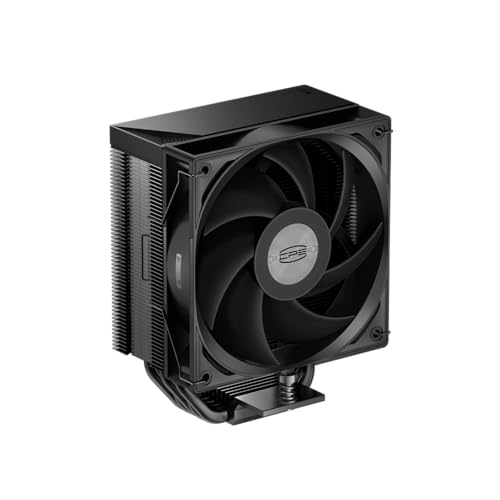
PCCOOLER RT500 TC
- Best for: Compact builds that need a single 120mm ARGB fan cooler.
- CPU air cooler
- 120mm ARGB fan
Compact builds that need a single 120mm ARGB fan cooler.
Heat-pipe count, socket list, and dimensions are not stated in the listing wording used here, so confirm all three on the listing before ordering.
The PCCOOLER RT500 TC states its case in a single short listing line: a CPU air cooler with a 120mm ARGB fan. That is the thinnest alt in the guide, and the pick rests on it openly — the listing states the cooler form and the ARGB fan size, and nothing else is claimed for it here. Its appeal is the compact statement itself: a 120mm lighted fan on an air-cooler tower, suited to builds where a single standard-size fan is the right scale and where the buyer will confirm the remaining details on the listing before ordering.
Which One Fits Your Situation
A first gaming build on a mainstream processor
Start with a single-tower ARGB cooler. The Assassin X120 Refined SE ARGB and the Hyper 212 Spectrum V3 ARGB both state four heat pipes and ARGB lighting, which suits a mainstream gaming processor without the height and memory-clearance demands of a twin tower. Check the socket list against your board first, then the case clearance, and keep the stock fan curve until you know how the build behaves under load.
A hot processor in long gaming sessions
Choose a dual-tower pick. The Peerless Assassin 120 SE ARGB states six heat pipes with dual fans, which gives more cooling surface for sustained loads, and its socket list covers current AMD and Intel platforms. Make sure the case has room for a twin tower and that the front fan clears tall memory modules before you commit to the larger form.
A windowed case built to be seen
Pick the cooler whose looks are part of the point. The Vision MAX ARGB White adds an IPS screen and a white finish to the twin-tower form, so the lighting, the display, and the colour all show through a windowed panel. In a closed case, skip the screen and spend the difference on airflow instead, since a display nobody sees adds no cooling.
A small case with tight clearance
Measure first, then choose the smallest stated form. A single-tower cooler with a 120mm fan, such as the PCCOOLER RT500 TC, is the right scale to check against a compact case, but its listing states no dimensions, so the measurement step is mandatory rather than optional. Confirm height, socket support, and memory clearance on the listing before ordering anything for a small case.
Common Mistakes
- Buying on the roundup headline instead of the listing’s own lighting wording — confirm LED, RGB, or ARGB in the listing title itself.
- Assuming AM4 and AM5, or LGA1700 and LGA1200, share mounting hardware — check the exact socket in the stated list.
- Ignoring cooler height until the side panel will not close — measure case clearance against the stated dimensions first.
- Assuming a twin-tower fan clears tall memory modules — check fan position against the memory slots nearest the processor.
- Treating heat-pipe count as a temperature guarantee — airflow, fan speed, and processor power draw all change the result.
Frequently Asked Questions
Does ARGB need special motherboard support?
ARGB lighting usually connects to an addressable RGB header or a controller, and the exact requirement depends on the cooler and the board. The listings used here state ARGB in the title but do not all state the connector type, so check the listing and your motherboard manual for a matching header before ordering. If no header is available, a separate controller may be needed.
Is a dual-tower cooler always better than a single tower?
Not always. A dual-tower cooler states more heat pipes and two fans, which suits hotter processors and longer sessions, but it is taller and can crowd memory slots. A single-tower cooler suits mainstream processors and smaller cases. Match the form to the processor’s heat output and the case’s clearance rather than assuming bigger is better.
Can I use an LED cooler with an older Intel socket?
Only when the listing states your socket. The socket lists in this guide differ: one pick covers LGA 1150, 1151, and 1155 alongside newer sockets, while others stop at LGA1700 and 1851. Find your exact socket in the stated list, and do not assume a bracket fits a socket the listing never names.
Why do some listings state so few specifications?
Some listings carry short titles that name only the form, the lighting, and one or two figures, and this guide uses only the wording those listings state. Where a detail is unstated — height, socket list, or fan size — the product section flags it openly instead of filling it in. Confirm every unstated detail on the listing before ordering.