Our Short List of 3
All 4 Picks at a Glance
| Product | Specs | Action |
|---|---|---|
 Skytech Gaming Azure 3 — RTX 5060 Mainstream Desktop | Check price on Amazon | |
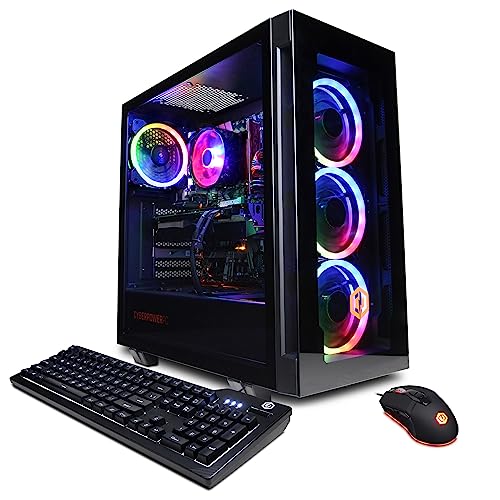 CyberPowerPC Gamer Xtreme VR — Core i7 and RTX 4060 Ti 16GB | Check price on Amazon | |
 iBUYPOWER Slate MESH — Core i7, RTX 4060 and 32GB DDR5 | Check price on Amazon | |
 Skytech Gaming King 95 — Ryzen 7 and RTX 5070 | Check price on Amazon |
Key takeaways
- Compare prebuilt gaming PCs that arrive fully assembled, from an RTX 5060 desktop to an RTX 5070 system, with page-stated CPUs, memory and storage.
As an Amazon Associate we earn from qualifying purchases.
A prebuilt gaming PC is a complete desktop computer that arrives already assembled, with the processor, graphics card, memory, storage, power supply and operating system fitted inside the case before it reaches you. That is the whole appeal. Instead of choosing a motherboard, checking that a cooler clears a case panel, wiring a power supply and installing Windows yourself, you unbox a finished tower, connect a monitor, keyboard and mouse, and start installing games. For anyone who wants to play rather than build, a prebuilt is the direct route from a box on the doorstep to a working gaming desk.
The trade-off is that you are buying someone else’s component choices, so reading those choices carefully matters more, not less. Two towers can look almost identical in a photograph and be built around very different hardware: one around a current graphics card with fast DDR5 memory, the other around an older card and slower memory that will show its age much sooner. The case lighting tells you nothing about that difference. The specification list tells you everything, which is why this guide works only from what each product page itself states.
Every system in this guide passed the same checks. Each one is a fully assembled gaming desktop sold on Amazon US — a complete tower, not a barebones kit, not a bare case and not a loose component. Each product page states its processor, graphics card, memory and storage, and those stated figures are the figures used below. Systems whose pages did not clearly describe a complete, assembled gaming desktop were left out, however strong their individual parts sounded.
The four systems divide by graphics tier. The Skytech Azure 3 pairs a Ryzen 5 with an RTX 5060 for mainstream play. The CyberPowerPC Gamer Xtreme VR pairs a Core i7 with an RTX 4060 Ti carrying a generous amount of graphics memory. The iBUYPOWER Slate MESH also uses a Core i7, with an RTX 4060 and double the system memory of the first two. At the top, the Skytech King 95 pairs a Ryzen 7 with an RTX 5070, the strongest card in this guide, with a larger power supply and liquid cooling. Read in that order, they form a ladder — find the rung that matches your games and your monitor.
Disclosure: This article contains affiliate links. If you buy through these links, we may earn a commission at no additional cost to you.
How to Choose a Gaming Prebuilt
Start with the graphics card
The graphics card does most of the work in a game, so it is the first line to read on any prebuilt listing. It renders every frame, and its model name and its own memory figure set the ceiling for resolution and settings. In this guide the ladder runs from the RTX 5060 in the Azure 3, through the RTX 4060 and the RTX 4060 Ti in the middle systems, to the RTX 5070 in the King 95. A card with more graphics memory, such as the 16GB stated for the RTX 4060 Ti in the CyberPowerPC system, has more room for high-resolution textures than an 8GB card. Match the card to your monitor first: a 1080p screen asks far less of a card than a 1440p or 4K screen, and buying graphics power your monitor cannot display is the most common way to overspend on a prebuilt.
Then check the processor
The processor feeds the graphics card, handles game logic and runs everything else at the same time — voice chat, a browser, recording software. The four systems use a Ryzen 5 7600, a Core i7-13700F, a Core i7-14700F and a Ryzen 7 9700X. A balanced pairing matters: the King 95 pairs its RTX 5070 with a Ryzen 7, while the Azure 3 pairs its RTX 5060 with a Ryzen 5, which is the proportionate match at that tier.
Memory: capacity and generation
System memory is listed two ways that both matter: how much there is, and which generation it is. Three of these systems state DDR5 memory, the current generation, at speeds their pages give as 5200 or 6000. The capacities run from 16GB in the Azure 3 and the CyberPowerPC to 32GB in the Slate MESH and the King 95. Sixteen gigabytes is the working standard for gaming alone. Thirty-two gigabytes gives the machine room to game, stream, record and keep many applications open at once without closing things down first, so players who create content or multitask heavily should weight the 32GB systems more strongly.
Storage speed and size
All four systems store games on solid-state drives, with the drive described as NVMe or Gen4 on several pages and a 1TB capacity stated across the guide. Solid-state storage is what makes a modern gaming PC feel fast outside games as well: Windows starts quickly and levels load quickly. One terabyte fills faster than new buyers expect, because modern installs are large, so plan on managing your library or adding storage later if you keep many large games installed at once.
Power supply and cooling
A prebuilt lives or dies by the parts listings show in small print. The power supply must suit the graphics card fitted today and ideally leave headroom for a stronger card tomorrow. The pages here state a 650W Gold power supply in the Azure 3 and an 850W Gold power supply in the King 95, which follows the graphics ladder exactly as it should. Cooling matters just as much over a long session. The King 95 states a 360mm ARGB AIO liquid cooler, a substantial radiator for sustained loads, while the other systems rely on the cooling fitted by their builders as described on their pages. A tower that runs hot will slow itself down to protect its components, so cooling is performance, not decoration.
Operating system and what is in the box
Each system here states Windows 11 Home, so none needs an operating system bought or installed separately. All four state Wi-Fi, so a wired connection is a choice rather than a requirement. Read the box contents on the page before ordering: the iBUYPOWER Slate MESH listing names a gamer keyboard and mouse among its contents, while other listings focus on the tower itself. A monitor is not part of any of these systems, so plan on adding your own display, and check the video outputs stated on the page — the CyberPowerPC listing, for instance, states HDMI and DisplayPort connections on its graphics card.
Skytech Gaming Azure 3 — RTX 5060 Mainstream Desktop
The Azure 3 is the entry point to this guide, and it is built around current-generation parts rather than leftovers. Its page states an AMD Ryzen 5 7600 processor running at 3.8GHz, an NVIDIA RTX 5060 graphics card, a 1TB NVMe SSD, 16GB of DDR5 RAM at 6000, a 650W Gold power supply, Wi-Fi and Windows 11. That is a coherent specification: a modern processor, the fastest memory speed named in this guide alongside the King 95, and a power supply sized for the card fitted.
What this system is for is high-refresh mainstream gaming on a 1080p monitor, with headroom for 1440p play in many titles at sensible settings. The supporting parts do not hold the RTX 5060 back: DDR5 memory at 6000 is quick, the NVMe drive keeps loading times short, and the Ryzen 5 7600 sits on a current platform, which keeps future processor upgrades a realistic option.
Its limits are the honest limits of its tier. Sixteen gigabytes of memory leaves less room for heavy multitasking than the 32GB systems below, and a buyer planning on a high-resolution monitor next should look further up this list rather than expect this system to grow into that screen. As a first gaming desktop, the Azure 3 states the cleanest, most current set of parts at its level in this guide.
CyberPowerPC Gamer Xtreme VR — Core i7 and RTX 4060 Ti 16GB
The Gamer Xtreme VR, model GXiVR8040A14, is the system in this guide for buyers who care about graphics memory. Its page states an Intel Core i7-13700F processor at 2.1GHz with 8+8 cores on the Intel B760 chipset, an NVIDIA GeForce RTX 4060 Ti graphics card with 16GB of video memory, 16GB of DDR5 memory, a 1TB PCIe Gen4 NVMe SSD, Wi-Fi readiness and genuine Windows 11 Home 64-bit. The page also states the card’s connections as one HDMI and two DisplayPort outputs, which suits a multi-monitor desk.
That 16GB graphics memory figure is the headline. Most cards at this level carry half as much, and the extra room matters for texture-heavy games at higher settings and for anyone who also edits video on the same machine. The Core i7-13700F is a strong partner for it, giving the system real capacity for streaming and background work while a game runs.
The balance to note is system memory. Like the Azure 3, this system states 16GB of DDR5, a step behind the two 32GB systems here even though its graphics memory leads the middle of the range. Buyers who keep many heavy applications open at once should compare it with the Slate MESH that follows, which trades graphics memory for double the system memory.
iBUYPOWER Slate MESH — Core i7, RTX 4060 and 32GB DDR5
The Slate MESH, model SMI7N4601, makes the opposite trade to the CyberPowerPC, and for many buyers it will be the right one. Its page states an Intel Core i7-14700F processor, an NVIDIA GeForce RTX 4060 graphics card with 8GB of graphics memory, 32GB of DDR5 RGB memory at 5200MHz, a 1TB SSD, Windows 11 Home, and a gamer keyboard and mouse included. iBUYPOWER describes this prebuilt as a machine for video games, editing and streaming, and the specification supports that breadth.
The 32GB of system memory is the reason to choose it. Gaming plus streaming software, a browser full of tabs, voice chat and recording tools is a normal evening load for many players now, and 32GB absorbs that load comfortably. The RTX 4060 remains a capable card for 1080p gaming and lighter 1440p play. The included keyboard and mouse also matter: they mean the box contains everything except the monitor, so the desk is complete on the first day.
Its compromise sits in the graphics card. The RTX 4060 with 8GB is a step below the 4060 Ti 16GB above and well below the RTX 5070 at the top of the guide, so this is not the choice for a buyer whose single priority is the highest settings at high resolution. It is the choice for the buyer whose PC has to do everything — play, stream, edit and work — and who would rather have memory headroom than the last step of graphics power.
Skytech Gaming King 95 — Ryzen 7 and RTX 5070
The King 95 is the strongest system in this guide on almost every line its page states. The specification is an AMD Ryzen 7 9700X processor at 3.8GHz with a 5.5GHz turbo boost, an NVIDIA RTX 5070 graphics card with 12GB of GDDR7 memory, a 1TB Gen4 SSD, 32GB of DDR5 RAM at 6000 with RGB lighting, an 850W Gold power supply, a 360mm ARGB AIO liquid cooler, Wi-Fi and Windows 11 Home. Every supporting part is sized for the card: the memory is both the largest and joint-fastest here, the power supply is the largest here, and the liquid cooler is the most substantial cooling named on any of these pages.
This is the system for a 1440p monitor, with a realistic path to high settings at that resolution across demanding titles. The RTX 5070’s GDDR7 memory is a generation newer than the memory in the middle systems, and the 360mm liquid cooler is there for sustained sessions: a card and processor working hard for hours need heat moved out of the case steadily.
The King 95 only makes sense if your monitor and your games will use what it states. On a basic 1080p screen, the Azure 3 already covers the need, and this system’s extra graphics power would sit largely unused. Matched to the right display, though, it is the complete statement of what a prebuilt can be in this guide: the strongest card, the joint-most memory, the biggest power supply and liquid cooling, assembled and ready under Windows 11.
Comparison Table
| System | ASIN | Processor (page-stated) | Graphics card (page-stated) | Memory (page-stated) | Storage (page-stated) | Operating system |
|---|---|---|---|---|---|---|
| Skytech Gaming Azure 3 | B0F8Q3K9ZS | AMD Ryzen 5 7600, 3.8GHz | NVIDIA RTX 5060 | 16GB DDR5 6000 | 1TB NVMe SSD | Windows 11 Home |
| CyberPowerPC Gamer Xtreme VR (GXiVR8040A14) | B0CBL8N3FC | Intel Core i7-13700F, 2.1GHz, 8+8 cores | NVIDIA GeForce RTX 4060 Ti, 16GB | 16GB DDR5 | 1TB PCIe Gen4 NVMe SSD | Windows 11 Home 64-bit |
| iBUYPOWER Slate MESH (SMI7N4601) | B0D6BYQ23R | Intel Core i7-14700F | NVIDIA GeForce RTX 4060, 8GB | 32GB DDR5 RGB 5200MHz | 1TB SSD | Windows 11 Home |
| Skytech Gaming King 95 | B0DVCZD19R | AMD Ryzen 7 9700X, 3.8GHz (5.5GHz Turbo Boost) | NVIDIA RTX 5070, 12GB GDDR7 | 32GB DDR5 6000 RGB | 1TB Gen4 SSD | Windows 11 Home |
Frequently Asked Questions
What does prebuilt actually mean for a gaming PC?
It means the desktop arrives fully assembled. The processor, graphics card, memory, storage, power supply and cooling are fitted inside the case by the builder, and the operating system is installed, as each page here states Windows 11 Home. Your setup work is connecting a monitor and peripherals, signing in and installing your games — not assembling hardware.
Which of these systems suits a 1440p monitor?
The King 95 is the clearest match, because its page states the strongest graphics card in the guide, the RTX 5070 with 12GB of GDDR7 memory, backed by 32GB of DDR5 and a 360mm liquid cooler. The CyberPowerPC, with its RTX 4060 Ti carrying 16GB of graphics memory, is the middle-ground option for that resolution. The Azure 3 and the Slate MESH are specified most naturally for 1080p play, with lighter 1440p use in less demanding titles.
Is 16GB or 32GB of memory the right amount?
For gaming on its own, the 16GB stated in the Azure 3 and the CyberPowerPC covers the task. For gaming alongside streaming, recording, editing or many open applications, the 32GB stated in the Slate MESH and the King 95 is the safer specification. Decide by what else runs while you play, not by gaming alone.
Do any of these systems include a monitor, keyboard or mouse?
None of the four pages describes a monitor as part of the system, so you will need your own display for any of them. The iBUYPOWER Slate MESH page names a gamer keyboard and mouse in its contents. For the other systems, read the box contents on the page and assume you will use peripherals you already own unless the listing states otherwise.
Can a prebuilt be upgraded later?
Generally yes, because these are standard desktop towers built from standard parts, and the details that govern upgrades are the ones stated on the pages: the power supply capacity, the memory generation and the storage fitted. The King 95’s stated 850W Gold power supply leaves more headroom for a future graphics card than the Azure 3’s stated 650W unit, which is worth weighing if you plan to keep the same tower through a card upgrade.
Why is there no hard drive in any of these systems?
Because gaming storage has moved to solid-state drives. Each page here states SSD storage — NVMe or Gen4 on three of the four — and that is what gives these machines their fast loading behaviour in Windows and in games. A 1TB SSD is the shared starting point across this guide, so library size, not drive type, is the storage question to consider.
Conclusion
The best gaming prebuilt is the one whose stated specification matches your monitor and the way you use a PC. If you play at 1080p and want a current, balanced first gaming desktop, the Skytech Azure 3 states exactly that. If graphics memory is your priority, the CyberPowerPC Gamer Xtreme VR and its RTX 4060 Ti with 16GB stand apart in the middle of the range. If your PC must game, stream, edit and multitask at once — and arrive with a keyboard and mouse in the box — the iBUYPOWER Slate MESH and its 32GB of memory are built for that breadth. And if you have, or are about to buy, a 1440p monitor and want the strongest assembled system here, the Skytech King 95 states the card, memory, power supply and cooling to justify it. Match the graphics card to your screen first and the memory to your habits second, and the right choice usually names itself.