Our Short List of 3

All 4 Picks at a Glance
| Product | Specs | Action |
|---|---|---|
 1. Brother HL-L2460DW Wireless Compact Monochrome Laser Printer | Check price on Amazon | |
| 2. Brother DCP-L2640DW Wireless Compact Monochrome Multi-Function Laser Printer | Check price on Amazon | |
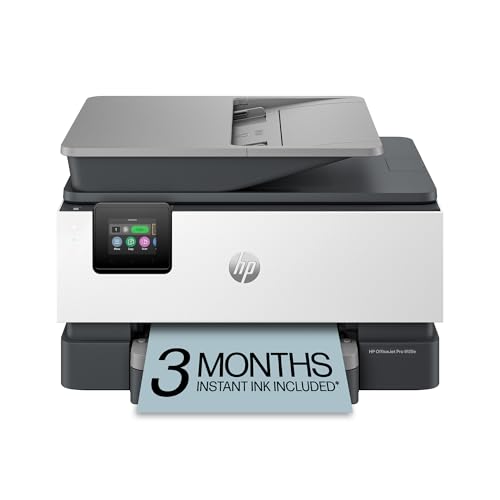 3. HP OfficeJet Pro 9125e Wireless All-in-One Colour Inkjet Printer | Check price on Amazon | |
 4. Epson EcoTank ET-4850 Wireless All-in-One Supertank Printer | Check price on Amazon |
Key takeaways
- Compare fast, high-volume printers for a home office using page-stated print speeds, paper capacities and duty cycle figures from four Amazon US listings.
As an Amazon Associate we earn from qualifying purchases.
A home office stops feeling small the moment the printing piles up. Client contracts, shipping labels, school paperwork, tax documents and multi-page reports can turn a slow desktop printer into the bottleneck of the whole working day. When a printer takes a minute to warm up, pauses between pages and needs its paper tray refilled every few dozen sheets, high-volume work becomes a series of interruptions rather than a single task you finish and forget.
Fast, high-volume printers solve that problem in three ways. First, raw print speed, measured in pages per minute, decides how long a long document keeps you waiting. Second, paper capacity decides how often you stop to reload: a 250-sheet tray holds roughly five times as much as the small trays on basic home models. Third, the monthly duty cycle and the ink or toner system decide whether the machine is built to sustain that pace week after week, or whether heavy use will wear it down and empty its cartridges at the worst possible moment.
This guide compares four printers sold on Amazon US that are suited to busy home offices: two fast monochrome laser models from Brother, a colour inkjet all-in-one from HP built for office workloads, and a cartridge-free supertank model from Epson. Every speed, capacity and duty-cycle figure below comes from the product pages themselves, so you can match the numbers to the way you actually print.
Disclosure: This article contains affiliate links. If you buy through these links, we may earn a commission at no additional cost to you.
How to Choose a Fast High-Volume Printer for a Home Office
Print speed: read the pages-per-minute figure carefully
Print speed is stated in pages per minute, usually shortened to ppm. Laser printers quote a single monochrome figure because most of their work is black text. Inkjet all-in-ones quote two figures, one for black and one for colour, and the colour figure is always lower. When you compare models, compare like with like: a laser at 36 ppm will clear a 60-page report in under two minutes of pure printing time, while a colour inkjet rated at 22 ppm in black needs closer to three. For text-heavy home offices, monochrome speed is the number that matters most.
Paper capacity and the document feeder
A 250-sheet input tray is the practical threshold for high-volume home use. It lets you load a full pack of paper at once and print long runs without standing by the machine. If you scan or copy multi-page documents, an automatic document feeder matters just as much: a 50-page feeder turns a stack of signed pages into a single unattended job, while a flatbed-only machine makes you place every sheet by hand. Two of the printers below include a document feeder, and all four hold 250 sheets of paper.
Duty cycle: the workload the machine is built for
The monthly duty cycle is the maximum number of pages the manufacturer rates the printer to produce in a month. You do not need to print anywhere near that figure, but it is a useful honesty check: a machine rated for tens of thousands of pages per month has the mechanics to shrug off a few thousand pages of home-office work, while a light-duty machine can struggle. The HP model below states a duty cycle of up to 25,000 pages per month, which is far beyond what most home offices need and a good sign of headroom.
Laser toner versus tank ink
Monochrome laser printers use toner cartridges and are at their best when nearly everything you print is black text: contracts, forms, invoices and manuscripts. Colour inkjets use liquid ink and handle mixed documents, charts and the occasional photo. Supertank inkjets replace small cartridges with refillable reservoirs, which suits very high page counts because a single fill covers a large volume of printing. None of these approaches is universally better; the right one follows from what fills your out-tray.
Connectivity and duplex printing
Dual-band Wi-Fi lets everyone in the house print from laptops and phones without a cable, Ethernet gives a fixed desk a stable wired link, and USB remains the simple fallback. Automatic two-sided printing, called duplex, halves paper use on long documents and produces professional-looking reports without manual page flipping. All four printers below offer wireless printing and automatic duplex.
The Printers Compared
1. Brother HL-L2460DW Wireless Compact Monochrome Laser Printer
The Brother HL-L2460DW is a print-only monochrome laser built around speed. Its Amazon US product page describes it as a choice for high-quality, high-volume printing and states a print speed of up to 36 pages per minute, with a maximum black-and-white resolution of 1200 x 1200 dpi. That combination is exactly what a text-heavy home office needs: long documents emerge quickly and stay sharp enough for contracts and formal correspondence.
Paper handling is sized for volume. The page lists a maximum input sheet capacity of 250 sheets, so a full ream fits in the tray with room to spare, and automatic duplex printing handles two-sided jobs without intervention. Because it is print-only, there is no scanner or copier, which keeps the footprint compact at a size that sits comfortably on a desk or shelf beside one.
Connectivity covers the usual home-office bases: dual-band Wi-Fi for wireless printing from computers and mobile devices, Ethernet for a wired network connection, and USB for a direct link to a single machine. The printer works with Alexa, and it uses Brother TN830 or TN830XL toner cartridges, giving you a choice between a standard cartridge and a higher-capacity option for heavier months.
Choose the HL-L2460DW if your printing is overwhelmingly black-and-white text and you want the fastest page rate in this roundup from a machine that does one job and does it quickly. It is the simplest route to clearing big print queues in a home office that does not need colour or scanning.
2. Brother DCP-L2640DW Wireless Compact Monochrome Multi-Function Laser Printer
The Brother DCP-L2640DW takes the same laser formula as its print-only sibling and adds the two functions busy home offices reach for daily: scanning and copying. Its Amazon US product page states print speeds of up to 36 pages per minute, matching the fastest rate in this guide, and describes the machine as an effective choice for high-volume printing, copying and scanning.
The standout addition is the 50-page automatic document feeder. Multi-page contracts, signed agreements and stacks of receipts can be scanned or copied in one unattended run instead of sheet by sheet on a flatbed. The flatbed scanner is still there for books, ID cards and fragile originals. Paper capacity matches the print-only model at 250 sheets, and automatic duplex printing is included for two-sided output.
Like the HL-L2460DW, the DCP-L2640DW connects over dual-band Wi-Fi, Ethernet or USB, works with Alexa, and uses TN830 or TN830XL toner cartridges. It prints only in monochrome, so colour documents are off the menu, but for offices whose output is letters, forms and reports, that is rarely a real limitation.
Choose the DCP-L2640DW if you want laser speed plus a proper document feeder for scanning and copying. Of the two Brother models, this is the one that replaces a separate scanner and handles the full paperwork cycle of a working home office.
3. HP OfficeJet Pro 9125e Wireless All-in-One Colour Inkjet Printer
The HP OfficeJet Pro 9125e is the colour all-in-one in this roundup, aimed squarely at office workloads. Its Amazon US product page states print speeds of 22 pages per minute in black and 18 pages per minute in colour, a maximum input sheet capacity of 250 sheets, and print, scan, copy and fax functions in a single machine. HP’s specification for the model gives a monthly duty cycle of up to 25,000 pages, the clearest high-volume rating among the four printers here.
Colour output reaches up to 4800 x 1200 optimised dpi on suitable photo paper, with black text at 1200 x 1200 rendered dpi, so presentations, charts and client-facing documents keep their colour and stay legible. The product page highlights fast colour printing, a 250-sheet paper capacity, and duplex scanning and copying, which means two-sided originals can be scanned and copied automatically rather than flipped by hand. Automatic duplex printing is also included.
The 9125e is an AI-enabled model with wireless connectivity for printing from laptops, tablets and phones, and it includes a trial of HP’s Instant Ink subscription service in the box. It uses HP 936 ink cartridges. For a home office that prints colour documents daily and wants a machine rated for sustained volume, this is the most complete package in the guide.
Choose the OfficeJet Pro 9125e if colour is non-negotiable and your monthly volume is the highest in the house: proposals, marketing material and reports that mix text, graphics and colour pages throughout the week.
4. Epson EcoTank ET-4850 Wireless All-in-One Supertank Printer
The Epson EcoTank ET-4850 approaches high volume from the ink side. Instead of cartridges, it uses refillable ink tanks, and its Amazon US product page positions it as an office printer with print, scan, copy and fax functions. The page states print speeds of 15.5 pages per minute in black and 8.5 pages per minute in colour, the slowest raw pace in this roundup, but speed is not the reason to buy a supertank: the reason is sustaining large page counts without constantly swapping small cartridges.
The ET-4850 includes an automatic document feeder for multi-page scanning and copying, plus Ethernet alongside Wi-Fi, which makes it easy to place on a home network as a shared machine for the whole household. Maximum print resolution is listed at 4800 x 1200 dpi, so colour documents and graphics print at a quality level suitable for reports and school projects as well as office paperwork.
Because the ink sits in tanks you refill from bottles, the ET-4850 suits homes where printing is constant and varied: homework, work documents, forms and colour pages flowing through the same machine every day. The trade-off is pace on very long single jobs, where the laser models above pull ahead.
Choose the EcoTank ET-4850 if your volume comes from steady, everyday colour printing by several people and you prefer refilling tanks to replacing cartridges, accepting a moderate print speed in exchange.
Comparison Table
| Printer | Type | Print speed (page-stated) | Paper capacity | Document feeder | Duty cycle (page-stated) |
|---|---|---|---|---|---|
| Brother HL-L2460DW (B0CPL2N5H6) | Monochrome laser, print only | Up to 36 ppm black | 250 sheets | No | Not stated in the listing summary |
| Brother DCP-L2640DW (B0CPLFTPCV) | Monochrome laser all-in-one | Up to 36 ppm black | 250 sheets | Yes, 50 pages | Not stated in the listing summary |
| HP OfficeJet Pro 9125e (B0CFM82NS2) | Colour inkjet all-in-one | 22 ppm black, 18 ppm colour | 250 sheets | Yes, with duplex scanning | Up to 25,000 pages per month |
| Epson EcoTank ET-4850 (B096N9JMXF) | Colour supertank inkjet all-in-one | 15.5 ppm black, 8.5 ppm colour | 250 sheets | Yes | Not stated in the listing summary |
Frequently Asked Questions
What print speed does a home office actually need?
For occasional printing, almost any speed works. For high-volume work, the difference adds up: at 36 ppm a 72-page document prints in about two minutes of engine time, while at 15.5 ppm the same job takes more than twice as long. If you regularly print documents longer than twenty pages, a rating above 20 ppm keeps the printer from becoming a bottleneck.
Is a laser or an inkjet better for high-volume home printing?
For black-and-white text at volume, a monochrome laser such as the two Brother models is the natural fit: fast pages, sharp text and toner that does not dry out between jobs. For colour documents, choose between a cartridge inkjet such as the HP OfficeJet Pro 9125e, which adds the highest stated duty cycle here, and a supertank inkjet such as the Epson EcoTank ET-4850, which replaces cartridges with refillable tanks for steady everyday volume.
What does monthly duty cycle mean, and should it decide my choice?
The duty cycle is the maximum number of pages per month the manufacturer rates the printer to handle. It is a ceiling, not a target. A higher figure, such as the 25,000 pages per month stated for the HP model, signals mechanics built for sustained work. Use it as a headroom check rather than the main deciding factor; speed, capacity and whether you need colour usually matter more day to day.
Do I need an automatic document feeder?
If you scan or copy multi-page documents more than occasionally, yes. A feeder such as the 50-page unit on the Brother DCP-L2640DW turns a stack of pages into one unattended job. If you only print, a print-only model such as the HL-L2460DW skips the scanner hardware entirely and keeps the machine smaller and simpler.
Can these printers handle two-sided printing automatically?
Yes. All four printers in this guide offer automatic duplex printing, so long reports and contracts can be printed on both sides without manually flipping pages. The HP model also supports duplex scanning and copying for two-sided originals.
Conclusion
The best fast, high-volume printer for a home office depends on what fills your tray. For pure black-and-white speed, the Brother HL-L2460DW prints at up to 36 ppm from a 250-sheet tray and asks nothing more of you. Add scanning and copying with a 50-page document feeder and the Brother DCP-L2640DW becomes the complete monochrome paperwork station. If colour and the highest stated monthly duty cycle matter most, the HP OfficeJet Pro 9125e pairs 22 ppm black printing with a 25,000-page monthly rating. And if your volume is steady, shared and colour-heavy, the Epson EcoTank ET-4850 trades raw pace for refillable tanks that keep everyday printing moving. Match the machine to your dominant document type, and the print queue stops being the slowest part of your working day.